



Try it: pick two dates
Each line is a formula from this guide with what Notion gives for your dates. Change Start or Due, add a time, or try one of the buttons. The math matches what we saw in our Notion test.
Today is November 6, 2026
-
dateBetween(prop("Due"), prop("Start"), "days")25 -
dateBetween(prop("Due"), prop("Start"), "weeks")3 -
dateBetween(prop("Due"), prop("Start"), "months")0 -
dateBetween(prop("Due"), today(), "days")14 -
dateAdd(prop("Start"), 7, "days")November 2, 2026 -
dateAdd(prop("Start"), 1, "months")November 26, 2026 -
formatDate(prop("Due"), )November 20, 2026 -
prop("Due") == today()false -
formatDate(prop("Due"), "YYYY-MM-DD") == formatDate(today(), "YYYY-MM-DD")false -
week(prop("Due"))47
Change a date, or try one of the buttons above.
1. Days, weeks or months between two dates
Our test table has a Start and a Due date. To count the days from one to the other, add a Formula property and paste this:
dateBetween(
  prop("Due"),
  prop("Start"),
  "days"
)
Put the later date first and the result is positive. Change "days" to "weeks" or "months" to count those. Notion counts
whole units only:
| Start to Due | Days | Weeks | Months |
|---|---|---|---|
| October 20 to November 14 | 25 | 3 | 0 |
| October 1 to October 31 | 30 | 4 | 0 |
| January 31 to March 1 | 29 | 4 | 1 |
| October 31 to November 3, 2:30 PM | 3 | 0 | 0 |
A month counts once the same day of the month comes round, so October 20 to November 14 is still 0 months. The time on a date counts too: 3 days and 14 hours is 3 days.
2. Days until or since today
Swap Start for today() to count from today:
dateBetween(
  prop("Due"),
  today(),
  "days"
)
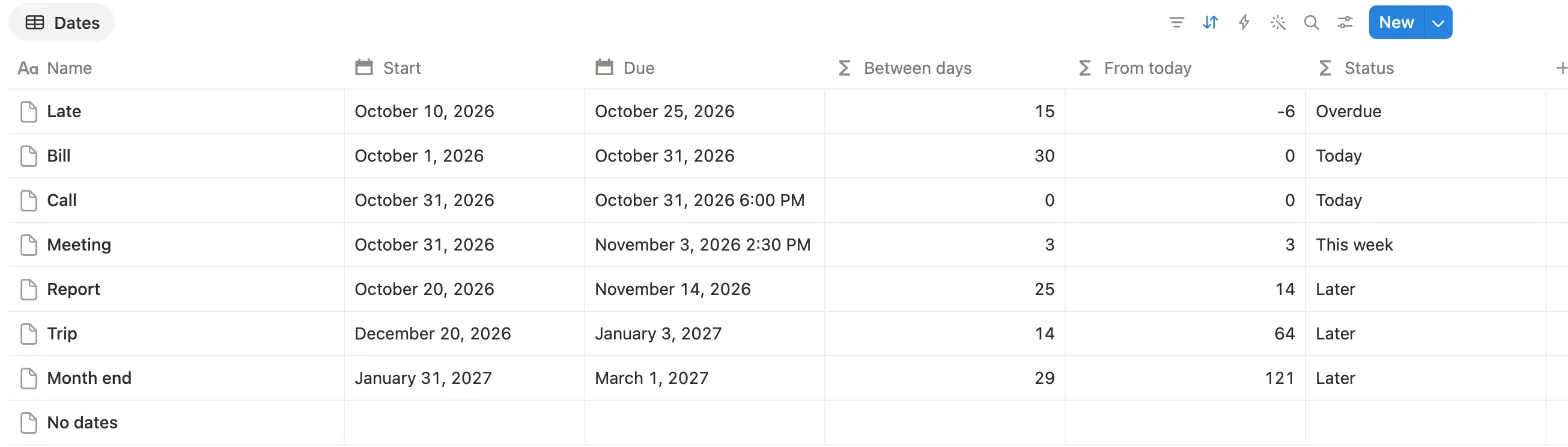
On October 31 our test gave 14 for November 14, 0 for October 31 and -6 for October 25. A negative number means the date has passed. Use today(), not
now(): now() includes the time of day, which can drop a day, as our
countdown formula test showed.
To turn the number into a label you can filter and sort by, wrap it in ifs:
lets(
  d, dateBetween(
    prop("Due"),
    today(),
    "days"
  ),
  ifs(
    empty(prop("Due")), "",
    d < 0, "Overdue",
    d == 0, "Today",
    d <= 7, "This week",
    "Later"
  )
)
3. Add or subtract days, weeks or months
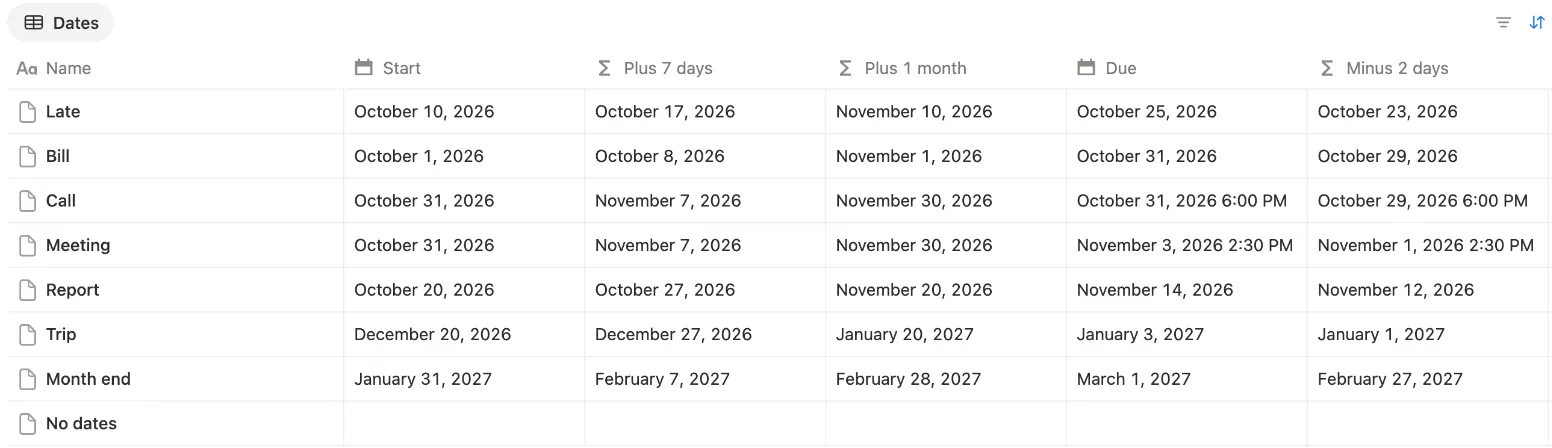
dateAdd moves a date forward. This gives the date a week after Start:
dateAdd(
  prop("Start"),
  7,
  "days"
)
dateSubtract takes it back, and keeps the time if the date has one: November 3 at 2:30 PM minus 2 days gave November 1 at 2:30 PM.
dateSubtract(
  prop("Due"),
  2,
  "days"
)
The unit can be "days", "weeks" or "months". Adding a month to January 31 gave February 28: when the new month is shorter,
Notion lands on its last day.
4. Format a date
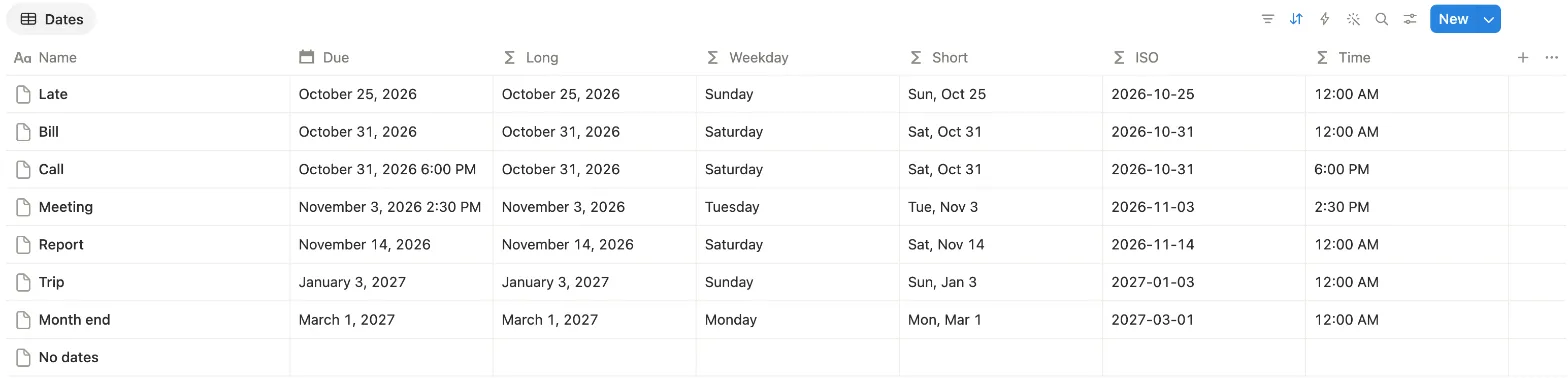
formatDate turns a date into text in the pattern you give it:
formatDate(
  prop("Due"),
  "MMMM D, YYYY"
)| Pattern | November 14, 2026 gave |
|---|---|
"MMMM D, YYYY" | November 14, 2026 |
"dddd" | Saturday |
"ddd, MMM D" | Sat, Nov 14 |
"YYYY-MM-DD" | 2026-11-14 |
"h:mm A" | 12:00 AM, or 2:30 PM for a date with that time |
A date with no time shows 12:00 AM for "h:mm A", so keep the time part for dates that have one.
5. Date ranges: start, end and length
dateRange makes one range from two dates. Ours showed October 20, 2026 → November 14, 2026:
dateRange(
  prop("Start"),
  prop("Due")
)
It works the other way too. Turn on End date in a Date property, here one called Trip, and dateStart and
dateEnd pull out each end. The nights of a trip from December 20 to January 3 came to 14:
dateBetween(
  dateEnd(prop("Trip")),
  dateStart(prop("Trip")),
  "days"
)
6. Is the date today, or already past?
prop("Due") == today() looks like the obvious check, and it worked for a Due of October 31. But for October 31 at 6:00 PM it said false: a date with
a time isn’t equal to today. Compare both dates as text instead:
formatDate(
  prop("Due"),
  "YYYY-MM-DD"
) ==
  formatDate(
    today(),
    "YYYY-MM-DD"
  )
That gave true for both. To check whether a date has passed, prop("Due") < today() was true only for October 25.
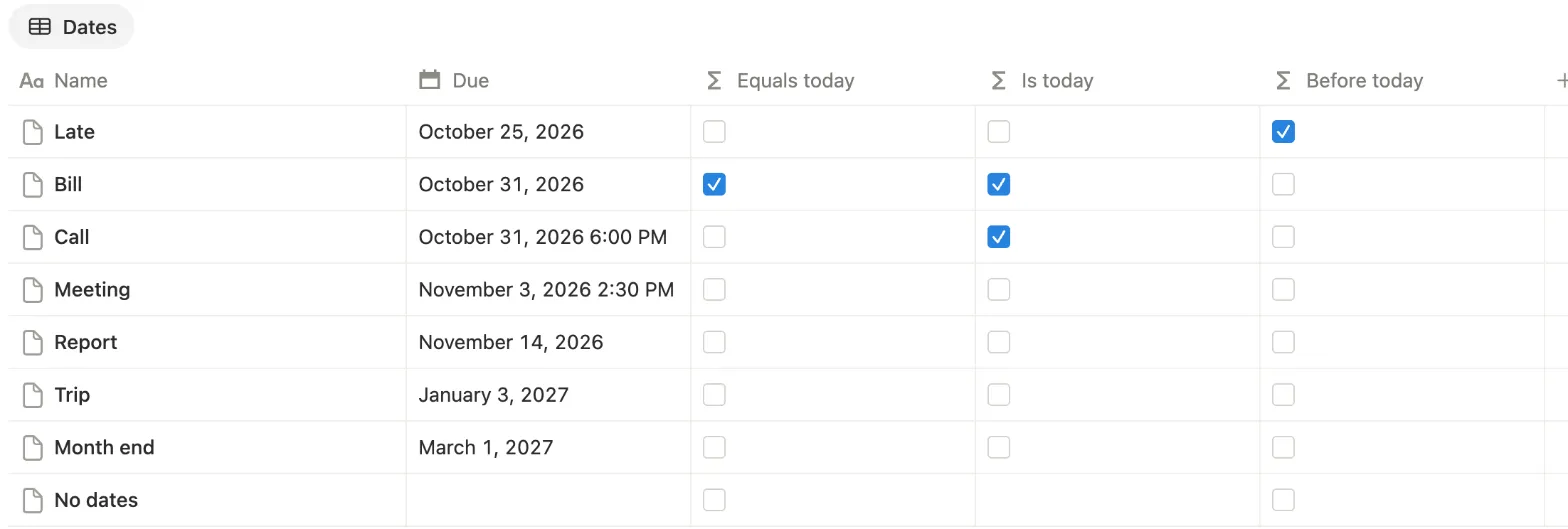
prop("Due") == today(). Is today is the formatDate check.7. Week number, weekday and month
A few functions pull one part out of a date as a number:
week(prop("Due"))gives the ISO week: 46 for November 14, 2026. January 3, 2027 gave 53, because that Sunday still belongs to the last week of 2026.day(prop("Due"))gives the weekday from Monday as 1 to Sunday as 7.date(prop("Due"))gives the day of the month, 14 for November 14.month(prop("Due"))gives 1 to 12, andyear(prop("Due"))the year.