We make Notion templates, and one of ours is on this page. It’s marked as ours and isn’t part of the ranking. How we tested
Short answer
Notion’s own Personal Finance Tracker is the most downloaded free one, but on the free plan its dashboard asks for the Business plan and its automations for a paid plan. Simple Budget & Finance Tracker has month pages only through December 2026, and NoFi’s month fields stop at 2024. Our Budget Tracker 2027 has budget limits, account balances, bills, savings goals and debts, set up through December 2027 and all on the free plan.
Pick what matters to you and the table keeps only the templates that have it. Click a name to jump to what we found when we used it. Numbers are from each
template’s Marketplace page on October 31, 2026.
Free plan: Notion’s free plan shows one chart per workspace. A template with charts works, but its charts stay locked if your workspace already uses its one chart.
How we tested them
We’re Magnet Creative, and we make Notion templates. On October 31, 2026 we opened the free budget templates on the Notion Marketplace, sorted by most
copied, and picked the most popular ones that do the classic job: log what you spend and see where your money goes.
We copied each one into a workspace on the free Notion plan, the same way you would.
We logged the same expense in each one, Groceries for $42.50, and checked every total, card and balance it should change.
We noted what a new copy comes with: sample data, charts, features that need a paid plan, and how its months run into 2027.
We took our own screenshots, wrote down what we saw, and then deleted our copies.
The order: Notion’s own templates first, then the rest by downloads on the Marketplace. We left out one free template that
requires your email before you can copy it, and paid templates by other makers, since we didn’t buy them to test.
1Personal Finance Tracker
by NotionGood for a card per month with income, expenses and net
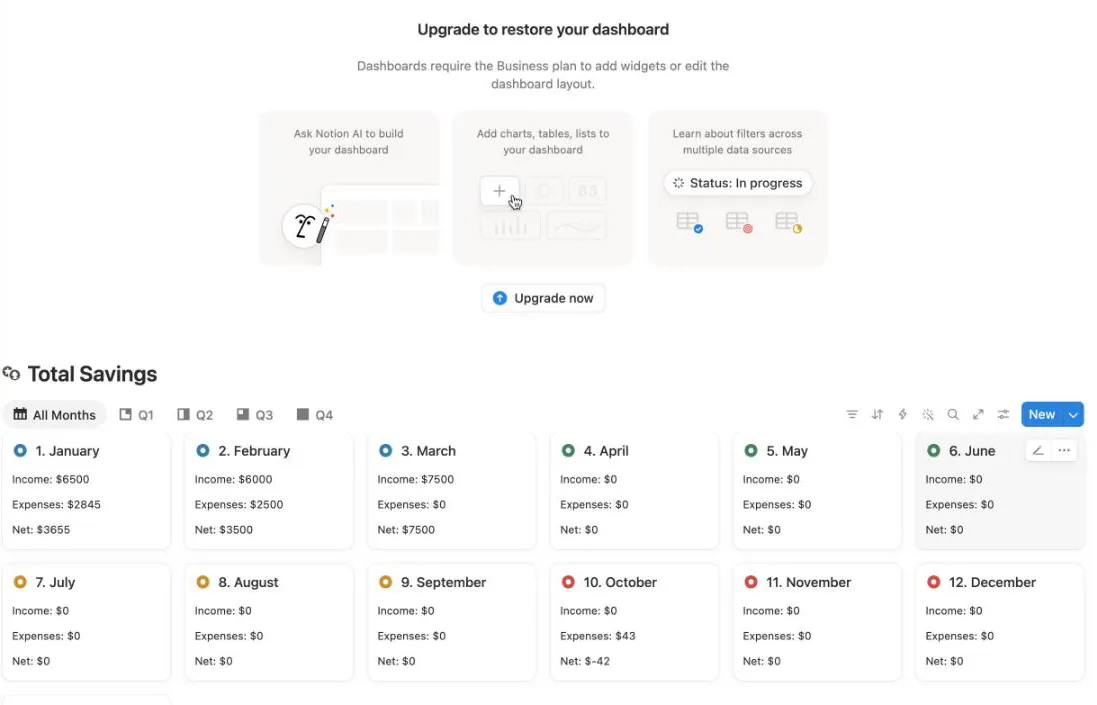
Top: the dashboard asks for the Business plan. Below: our $42.50 shows as $43 in expenses and a net of $-42 on the October card.
Downloads
365,589
Rating
4.8 from 2,893
Last updated
March 2026
Price
Free
Its Marketplace page promises date stamps and tax reminders through Notion’s database automations. The page opens with a Finance Dashboard, then Total
Savings with a card for each month, and Income and Expenses tables grouped by month.
What we saw on the free plan: the dashboard said “Upgrade to restore your dashboard” and that dashboards require the Business plan. A new expense came with
no date and no month, and the automations button asked us to upgrade. Once we added the expense under October by hand, the October card showed $43 in
expenses and a net of $-42. The sample rows are from 2025 and the month cards have no year, so delete the samples before you start.
Good
Made by Notion, with the most downloads on this list
A card for each month with income, expenses and net
Income and expenses grouped by month and by quarter
Watch out for
The Finance Dashboard needs the Business plan
Its automations need a paid plan, so you fill in the date and month yourself
Month cards have no year, so 2027 adds into the same twelve cards
Cards round each line: $42.50 showed as $43 and the net as $-42
by NotionGood for two lists and a total, nothing more
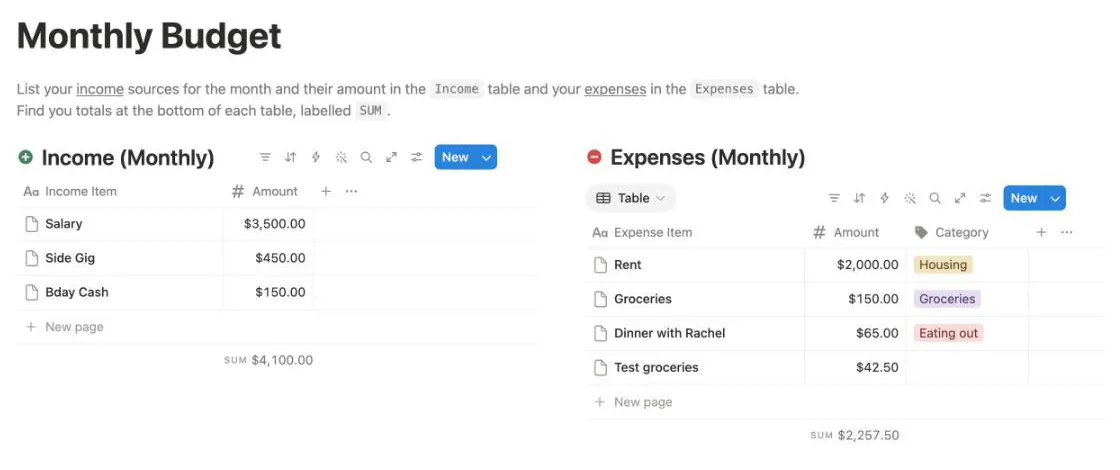
We added a $42.50 row: the expenses sum went from $2,215.00 to $2,257.50.
Downloads
40,143
Rating
4.8 from 499
Last updated
November 2024
Price
Free
One page with two tables. Income has a name and an amount; Expenses add a category. Each table shows its sum at the bottom, and a short note says that’s
where your totals are.
What we saw: the copy has sample rows, like a $3,500 salary and $2,000 for rent. A new $42.50 row moved the expenses sum to $2,257.50. There’s nothing to
set up and nothing to break, but you do the subtraction yourself.
Good
Ready in a minute, nothing to set up
Made by Notion
No dates, so it works in any year
Everything works on the free plan
Watch out for
No budget per category and no “left to spend”
One month at a time: clear the rows or copy the page each month
by SenteleGood for budgets per category with quick add buttons
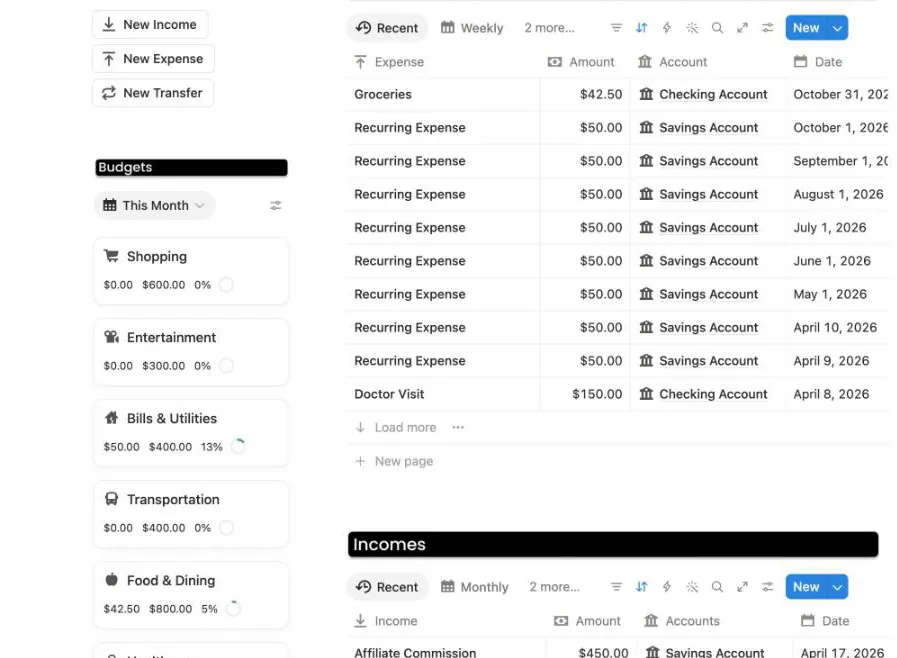
Our $42.50 Groceries expense: Food & Dining moved to 5% of its $800 budget.
Downloads
133,001
Rating
4.9 from 3,984
Last updated
July 2026
Price
Free
Three buttons at the top: New Income, New Expense and New Transfer. Under Budgets, a card for each
category shows what you spent this month, its budget and a ring. Next to it sit your expenses, your income, transfers between accounts and a card for each
account with its balance.
What we saw: New Expense opened a page with today’s date already in. We typed Groceries, $42.50, and picked Food & Dining and Checking Account. The Food &
Dining card went to $42.50 of $800, and Checking Account dropped from $19,724.51 to $19,682.01. The one thing that didn’t show for us was the Expense
chart: the free plan allows one chart per workspace, and ours was already in use.
Good
New Expense fills in today’s date for you
Budget cards count only this month, so 2027 needs no setup
Account balances change with every expense
Watch out for
The Expense chart uses your one free chart
Sample rows to delete first, like a $50 Recurring Expense on the 1st of each month
An ad for the maker’s paid Finance Manager near the top
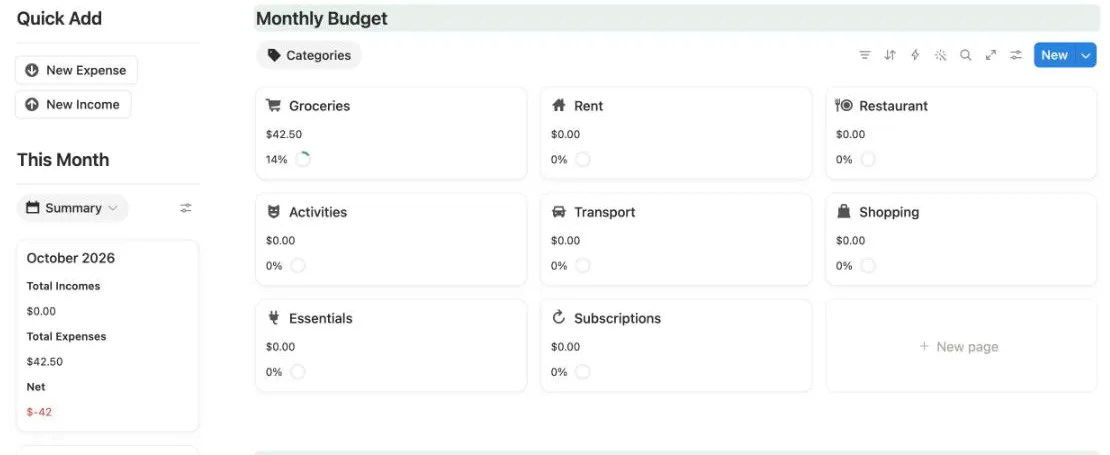
by Katia CreatesGood for a calm monthly budget page
Our Groceries expense in October 2026: the Groceries card shows 14%, and the month summary counts it too.
Downloads
88,943
Rating
4.8 from 1,230
Last updated
September 2025
Price
Free
A welcome box with four setup steps and a link to a video tutorial. Quick Add has New Expense and New Income. This Month shows the month’s
income, expenses and net, and Monthly Budget has a card for each of 8 categories, from Groceries to Subscriptions. Below: expenses, income
and a card for every month of 2026.
What we saw: the copy comes with no transactions and the budgets already filled in. New Expense put in today’s date but left the month empty. Once we
picked October 2026, the Groceries card went to $42.50 and 14%, and the October summary showed it. We searched the month list for 2027 and found nothing,
so for next year you add twelve month pages first.
Good
New Expense fills in today’s date
Budget cards for 8 categories, each with a %
A summary card for each month
No charts, all on the free plan
Watch out for
You pick the month on every expense by hand
Month pages stop at December 2026, so you add 2027’s twelve yourself
Accounts, savings goals and subscriptions are in the paid PRO version
by NoFiGood for bank sync, if you sign up with NoFi
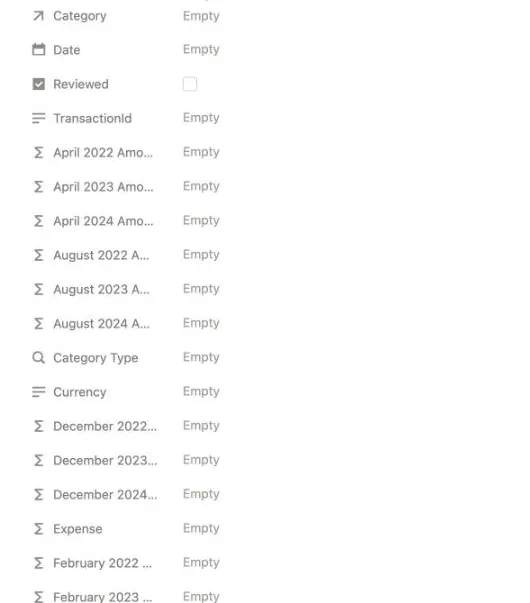
A transaction we added by hand: a formula field for every month from 2022 to 2024, and none for later years.
Downloads
36,489
Rating
4.5 from 80
Last updated
July 2025
Price
Free
A note at the top says that to connect your bank accounts for automated data entry, you create an account at nofi.so. Inside: Transactions with a Need
Review tab, Accounts split into assets and liabilities, Budget Categories with a tab for each month, and Monthly Summaries. A new copy is empty.
What we saw: we don’t sign up for outside services in our tests, so we used it by hand and didn’t test the sync. A new transaction came with no date.
Budget Categories has 36 month tabs, and searching them for 2025 found nothing. Each transaction has a formula field for every month from January 2022 to
December 2024, so by hand it doesn’t cover 2025, 2026 or 2027.
Good
Can fill in transactions from your bank, through a NoFi account
Accounts split into assets and liabilities
A summary for each month
Watch out for
Bank sync needs an account on nofi.so
Used by hand, its month tabs and month fields stop at December 2024
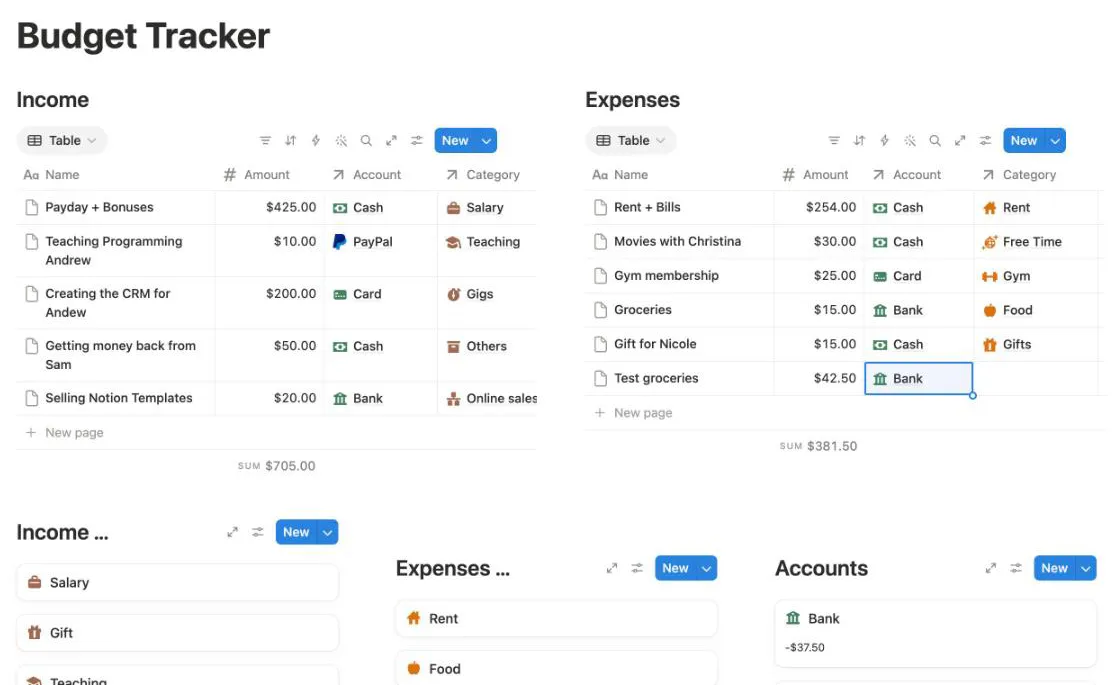
by Gheorghe ListruGood for a balance for each account
A $42.50 expense paid from Bank: the expenses sum rose to $381.50 and Bank went from $5.00 to -$37.50.
Downloads
31,540
Rating
4.8 from 421
Last updated
July 2025
Price
Free
Income and Expenses tables, each row with an amount, an account and a category, and a sum under each table. Below them: income categories, expense
categories and a card for each account with its balance.
What we saw: a new $42.50 expense from Bank moved the expenses sum from $339.00 to $381.50 and the Bank card from $5.00 to -$37.50. There are no budgets, so
it tells you where your money went, not what’s left to spend.
Good
A balance for each account: bank, card, PayPal and cash
Categories for income and for expenses
No dates to run out
Everything works on the free plan
Watch out for
No budget limits
One long list, with no month view except a calendar
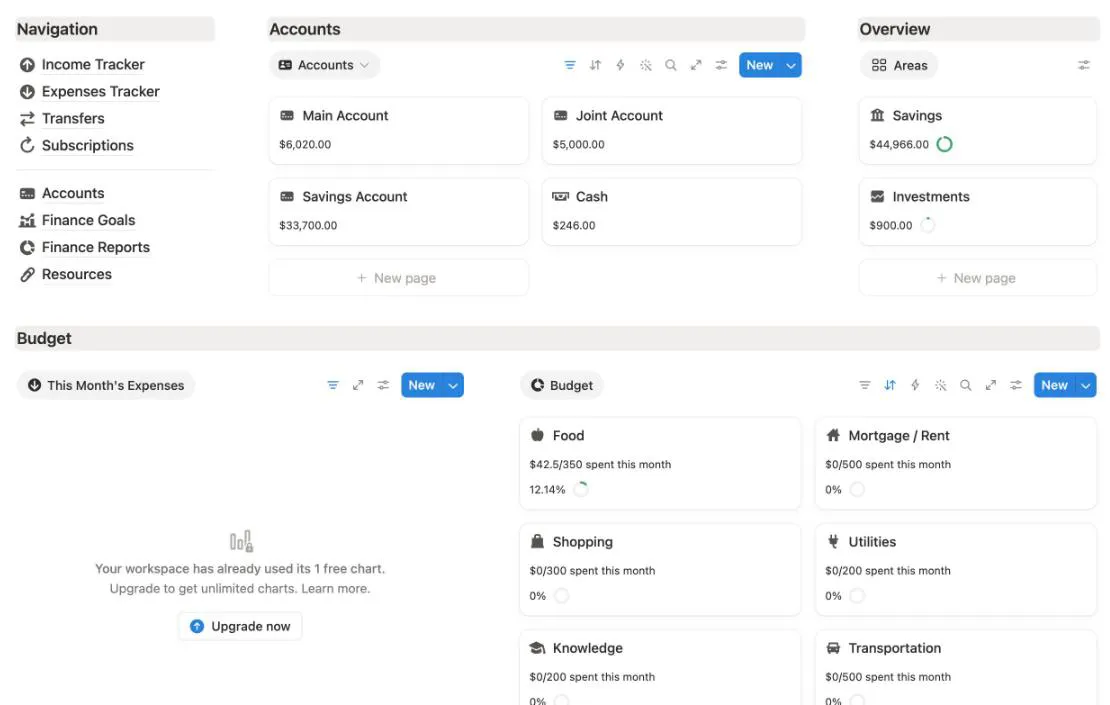
by PabloGood for accounts, savings and budgets on one page
After our $42.50 Groceries expense: Main Account went down and the Food card reads $42.5/350.
Downloads
25,871
Rating
4.8 from 290
Last updated
June 2026
Price
Free
A menu to Income Tracker, Expenses Tracker, Transfers, Subscriptions, Accounts, Finance Goals and Finance Reports. Then a card for each account with its
balance, an overview of savings and investments, and a Budget card for each category that reads like “$0/350 spent this month”. Expense
and income tables below show this month.
What we saw: a new expense opened with today’s date. With Groceries, $42.50, Food and Main Account, the Food card went to $42.5/350 and 12.14%, Main
Account went from $6,062.50 to $6,020.00 and Savings from $45,008.50 to $44,966.00. The home page has one chart and the Finance Reports page four more.
On the free plan you see one of the five, and only if your workspace has no other chart.
Good
New expenses get today’s date
Accounts, savings and budget cards all update from one expense
Pages for subscriptions, finance goals and transfers
Updated in June 2026
Watch out for
Five charts, and the free plan shows one
Card amounts show one decimal, like $42.5
An ad for the maker’s paid Life Planner at the bottom
by Raiu RajamoneyGood for the 50/30/20 rule with nothing to set up
A $4,000 salary and $42.50 for groceries: the budgets split 50, 30 and 20, and needs shows $42.5 of $2000.
Downloads
16,637
Rating
4.9 from 198
Last updated
July 2025
Price
Free
It explains the rule at the top: 50% of your income goes to needs, 30% to wants and 20% to savings or debt. You type your income and the amount of each
bill. A Monthly Statistics card shows your total income, total expenses, what’s left, and needs, wants and savings against their share.
What we saw: a $4,000 salary set the budgets to $2000 for needs, $1200 for wants and $800 for savings. $42.50 on Groceries showed as “Needs: $42.5 out of
$2000 budget”. It’s a one-month sheet: each bill is one row with one amount, so for a new month you change the amounts or copy the page.
Good
Type your income and it splits it 50/30/20 for you
19 common needs already listed, plus wants and savings
No dates and no charts: it works on the free plan in any year
Explains the 50/30/20 rule at the top
Watch out for
One month at a time: no dates and no history
Add rows only by duplicating or with its templates, or the summary breaks (the template warns you)
Totals show one decimal and no comma, like $3957.5
We make Notion templates, and Budget Tracker 2027 is ours. It costs $12, so it isn’t ranked with the free ones above. None of the eight free
ones has budget limits, account balances and the date filled in for you, all on the free plan and set up for 2027. Ours has all of them.
Yes, many. Notion has two of its own, and on October 31, 2026 the Notion Marketplace listed 773 free budget templates. All eight on this page are free: open the Marketplace page, click Get template and pick your workspace.
Which free Notion budget template works for 2027?
The two Finance Trackers, by Sentele and by Pablo, count this month from the date, so they keep working in 2027. The 50/30/20 budget tracker, Notion’s Monthly budget and the Budget Tracker by Gheorghe Listru have no dates at all. Simple Budget & Finance Tracker has month pages through December 2026, so you add 2027’s yourself.
Do free budget templates work on the free Notion plan?
Most of them do. Two limits came up. The free plan shows one chart per workspace, which affects the Sentele and Pablo trackers. And Notion’s own Personal Finance Tracker opens with a dashboard that needs the Business plan, and its automations need a paid plan.
Can a Notion budget template connect to my bank?
Not by itself. NoFi’s template can be filled from your bank through an account at nofi.so, which we didn’t test. Every other template here works by adding each expense yourself, which takes a few seconds.
Why did you leave some popular budget templates out?
We only list templates we copied and used ourselves. We didn’t buy paid templates by other makers, so they aren’t here. We also left out one free template that requires your email address before you can copy it.
Why is your own template on this page?
We make Notion templates, and Budget Tracker 2027 is ours. It costs $12, so it’s not ranked with the free ones. It has its own section at the end, with what it adds over the free ones.