


Try it: who’s next
The list below runs the same formulas as the Notion setup in this guide, starting from the day we tested it. Click Next day to watch a birthday that has passed move to next year by itself, or add someone of your own.
Coming up
- Ava Turns 36 today Oct 31, 2026
- Ben Turns 41 tomorrow Nov 1, 2026
- Eve Turns 48 in 55 days Dec 25, 2026
- Finn Turns 15 in 66 days Jan 5, 2027
- Dan Turns 27 in 120 days Feb 28, 2027
- Cara Turns 35 in 364 days Oct 30, 2027
1. A list of people
One database holds everyone, with their birthday as a date. Everything else is worked out from that one date.
- Make a new page called Birthdays. On it, type
/table, pick the table option and call the database People. - Add a Date property called Birthday. Add a Select called Relationship too if you like, with Family, Friends and Work.
- Add a page for each person and pick their birthday, year included.
Type the real birth year if you know it. The formulas below use it to say how old someone is turning.
2. A next birthday formula that rolls over
Birthday holds the day someone was born, so it’s years in the past. Add a Formula property called Next birthday. It moves the birthday to this year, and once that day has passed, to next year:
lets(
  b, prop("Birthday"),
  thisYear, dateAdd(b, year(today()) - year(b), "years"),
  if(
    thisYear < today(),
    dateAdd(b, year(today()) - year(b) + 1, "years"),
    thisYear
  )
)
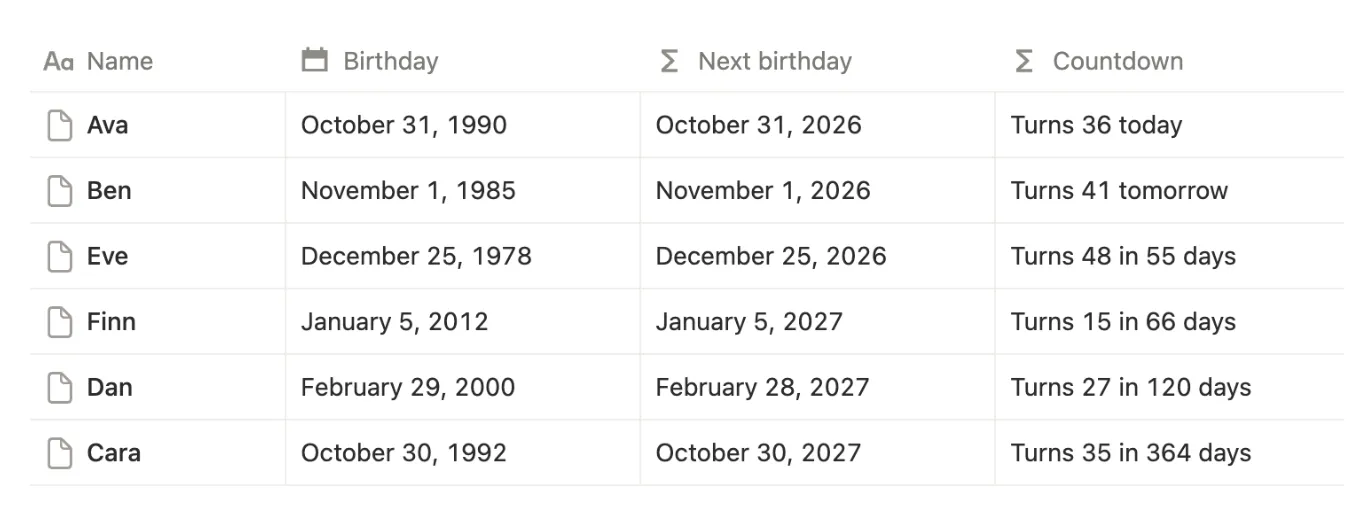
We tested it on Saturday, October 31. Ava, born October 31, 1990, showed October 31, 2026. Cara, born October 30, 1992, had her birthday the day before, so she showed October 30, 2027. Nothing needs updating in January; every birthday moves on by itself.
3. A countdown that says who turns what
Three more formulas turn that date into something you can read at a glance. First, Days until:
dateBetween(prop("Next birthday"), today(), "days")Then Turns, the age they’ll be on that day:
year(prop("Next birthday")) - year(prop("Birthday"))And Countdown, which puts both into one line:
lets(
  d, prop("Days until"),
  "Turns " + format(prop("Turns")) + " " + ifs(
    d == 0, "today",
    d == 1, "tomorrow",
    "in " + format(d) + " days"
  )
)
4. See who’s next
A list that keeps the next birthday on top is the view you’ll use most.
- Click + next to the view name, add a List view and call it Coming up.
- Click Sort, pick Days until and leave it on Ascending.
- Open the view’s settings, click Properties and show Countdown.
In our test, the list read Ava, Ben, Eve, Finn, Dan and Cara. Cara, whose birthday was the day before, went to the bottom.
To see only the next month, click Filter, pick Days until, change = to ≤ and type 30.
5. A birthday calendar
Birthdays look natural on a calendar, but a calendar by Birthday would put them in the year each person was born. Use Next birthday instead.
- Click + next to the view name and add a Calendar view called Calendar.
- In the view settings, click Show calendar by and pick Next birthday.
Each person shows up once, on their next birthday, so the calendar covers the coming twelve months. In our test, Ava sat on October 31 and Ben on November 1.
6. Their age today
Turns is the age someone is about to be. For the age they are now, add one more formula called Age:
dateBetween(today(), prop("Birthday"), "years")It counts whole years. Ben, who turned 41 the day after our test, showed 40.