


Try it: close a trade
Six trades, one still open. Type an exit price and watch P&L, R and the result change, the same way the formulas below work in Notion. The numbers at the top are the ones Notion’s Calculate row gives.
Net P&L $256.00
Win rate 60% 3 wins of 5 closed
Average R 0.44
- AAPL Long Entry 180 Size 50 Fees $2.00 Risk $150.00$298.00 R 1.99 Win
- EUR/USD Short Entry 1.085 Size 10000 Fees $0.00 Risk $50.00$30.00 R 0.6 Win
- TSLA Long Entry 250 Size 20 Fees $2.00 Risk $100.00-$122.00 R -1.22 Loss
- SPY Short Entry 520 Size 10 Fees empty Risk $60.00$50.00 R 0.83 Win
- NVDA Long Entry 900 Size 5 Fees $1.00 Risk $75.00P&L empty R empty Open
- MSFT Long Entry 410 Size 10 Fees $0.00 Risk $40.00$0.00 R 0 Breakeven
Type an exit for NVDA to close it, or change any exit and watch P&L, R and the win rate.
1. Set up the Trades database
Each trade is one page. Make a table called Trades and give it these properties:
| Property | Type | What it holds |
|---|---|---|
| Trade | Title | The symbol, like AAPL or EUR/USD |
| Date | Date | The day you opened it |
| Direction | Select | Two options: Long and Short |
| Entry | Number | Your entry price |
| Exit | Number | Your exit price, empty while the trade is open |
| Size | Number | Shares, or units for forex |
| Fees | Number | Commission for the whole trade |
| Risk | Number | What you’d lose if your stop were hit |
Open Fees and Risk, pick Edit property and set Number format to your currency. Name the Direction options exactly Long and Short: the formula looks for the word Short.
2. The P&L formula
Add a Formula property called P&L and paste this:
if(
  empty(prop("Exit")),
  toNumber(""),
  (prop("Exit") -
    prop("Entry")) *
    prop("Size") *
    if(
      prop("Direction") ==
        "Short",
      -1,
      1
    ) -
    if(
      empty(prop("Fees")),
      0,
      prop("Fees")
    )
)
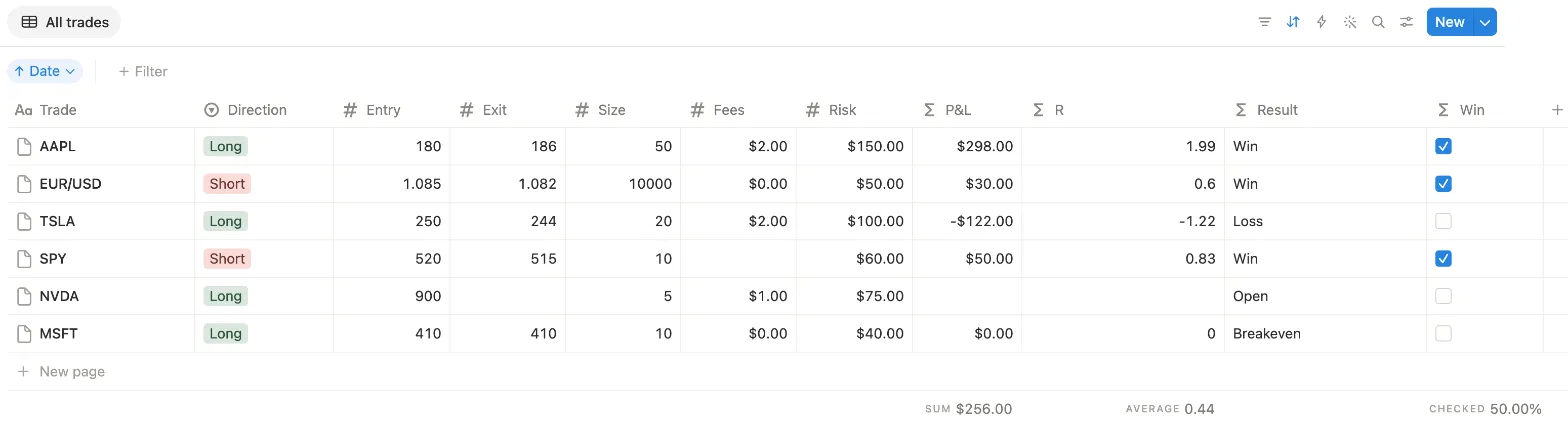
It takes Exit minus Entry, times Size, flips the sign for a short and takes off the fees. An empty Fees counts as 0. With no Exit, the trade is still open and P&L stays empty. Set its Number format to your currency too. Here’s what Notion showed in our test:
| Trade | What happened | P&L |
|---|---|---|
| AAPL | Long 180 to 186, 50 shares, $2 fees | $298.00 |
| EUR/USD | Short 1.085 to 1.082, 10,000 units | $30.00 |
| TSLA | Long 250 to 244, 20 shares, $2 fees | -$122.00 |
| SPY | Short 520 to 515, 10 shares, Fees empty | $50.00 |
| NVDA | Long at 900, no exit yet | Empty |
| MSFT | Long 410 to 410, 10 shares | $0.00 |
3. R, Result and Win
R is the result measured in what you risked, so a small trade and a big one sit on the same scale. Add a formula called R:
lets(
  pnl, if(
    empty(prop("Exit")),
    toNumber(""),
    (prop("Exit") -
      prop("Entry")) *
      prop("Size") *
      if(
        prop("Direction") ==
          "Short",
        -1,
        1
      ) -
      if(
        empty(prop("Fees")),
        0,
        prop("Fees")
      )
  ),
  if(
    empty(prop("Exit")) or
      empty(prop("Risk")),
    toNumber(""),
    round(
      pnl / prop("Risk") * 100
    ) / 100
  )
)
The part after pnl is the P&L formula again, so R works on its own. It divides P&L by Risk and rounds to two decimals: $298 on $150 at risk is
1.99.
Why does it check Exit and not P&L? Notion’s empty() counts 0 as empty. Our first try checked empty(pnl), and the MSFT trade, closed
at exactly its entry, lost its R. Checking Exit keeps R at 0 there.
Result puts each trade in words:
lets(
  pnl, if(
    empty(prop("Exit")),
    toNumber(""),
    (prop("Exit") -
      prop("Entry")) *
      prop("Size") *
      if(
        prop("Direction") ==
          "Short",
        -1,
        1
      ) -
      if(
        empty(prop("Fees")),
        0,
        prop("Fees")
      )
  ),
  ifs(
    empty(prop("Exit")), "Open",
    pnl > 0, "Win",
    pnl < 0, "Loss",
    "Breakeven"
  )
)
And Win is a checkbox for the win rate. Notion shows a formula that gives true or false as a checkbox:
lets(
  pnl, if(
    empty(prop("Exit")),
    toNumber(""),
    (prop("Exit") -
      prop("Entry")) *
      prop("Size") *
      if(
        prop("Direction") ==
          "Short",
        -1,
        1
      ) -
      if(
        empty(prop("Fees")),
        0,
        prop("Fees")
      )
  ),
  if(
    empty(prop("Exit")),
    false,
    pnl > 0
  )
)
4. Net P&L, average R and win rate
Notion works these out under the table. Hover below a column, click Calculate and pick:
- Under P&L, More options and Sum. Ours showed $256.00.
- Under R, More options and Average. Ours showed 0.44: NVDA has no R, so Notion averaged the five closed trades.
- Under Win, Percent and Percent checked. Ours showed 50.00%.
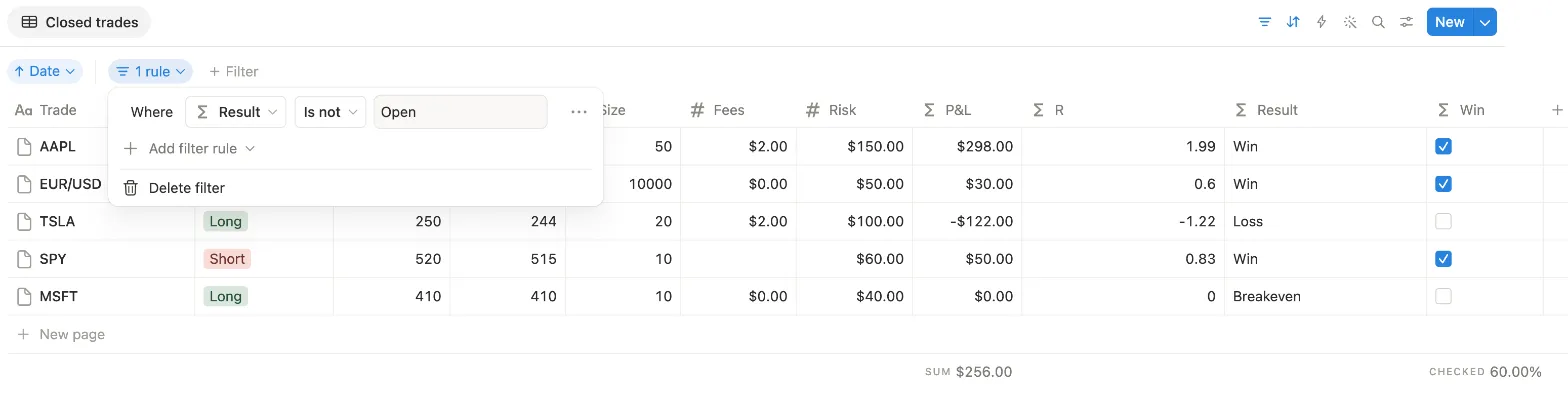
That 50% counts NVDA as a trade you didn’t win, though it’s still open. Three wins out of five closed trades is 60%. To get that number, make a view that leaves open trades out:
- Click + next to the view name at the top of the table, pick Table and call it Closed trades.
- Click the filter icon, pick Result, set the condition to Is not and type Open.
- Set the same Calculate row in this view: Sum under P&L, Average under R and Percent checked under Win.
If the numbers look off
- P&L is empty. The trade has no Exit yet, so it counts as open. Type the exit price once you close it.
- R is empty but P&L isn’t. Risk is empty. Fill in what you’d have lost at your stop.
- A short trade shows the wrong sign. Check that Direction says exactly Short, and that the property names in the formula match yours, capitals included.
- A forex trade shows a tiny P&L. Put the size in units, not lots: 10,000 units of EUR/USD from 1.085 to 1.082 gave $30.00 in our test. The result comes out in the pair’s second currency, so a pair that doesn’t end in USD needs converting.
- The win rate looks low. Open trades count in Percent checked. Read it in the Closed trades view.