8 Free Notion Student Planner Templates, Tested for 2027
By Magnet Creative
Checked
We make Notion templates, and one of ours is on this page. It’s marked as ours and isn’t part of the ranking. How we tested
Short answer
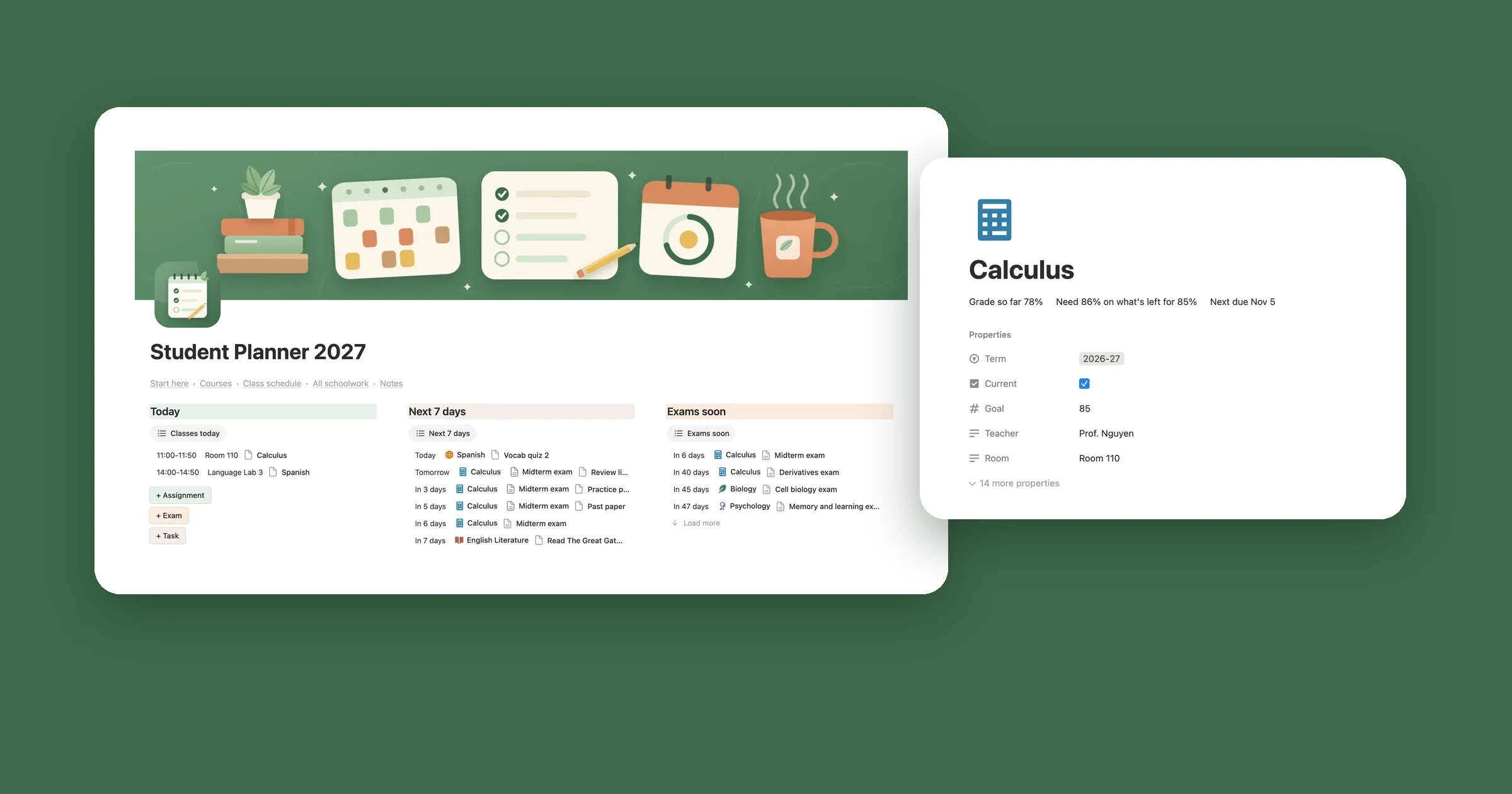
Notion’s own Student Planner and Student dashboard group your work by course, but they come with samples from 2023 and 2024 and have no class schedule. The most downloaded, Janice Studies’ student dashboard, is a cozy daily page with blank course pages, and none of the eight works out your grade. Our Student Planner 2027 shows your grade in every course, the score you need for your goal, exam countdowns and a weekly schedule built from your class times, all on the free plan.
Pick what matters to you and the table keeps only the templates that have it. Click a name to jump to what we found when we used it. Numbers are from each
template’s Marketplace page on October 31, 2026.
Free plan: all eight worked on the free plan in our tests. My Class Schedule keeps a few extras, like a Live Block, for its paid Premium version.
How we tested them
We’re Magnet Creative, and we make Notion templates. On October 31, 2026 we opened the free student templates on the Notion Marketplace, sorted by most
copied, and picked the most popular planners and dashboards for classes and schoolwork.
We copied each one into a workspace on the free Notion plan, the same way you would.
We added one piece of schoolwork to each, like an essay, a lab report or a study session with a date, and checked every list, card and calendar it should
show up on. My Class Schedule has no schoolwork, so there we added a class.
We noted what a new copy comes with: sample data, blank placeholders, outside widgets, paid extras and old dates.
We took our own screenshots, wrote down what we saw, and then deleted our copies.
The order: Notion’s own templates first, then the rest by downloads on the Marketplace. Paid templates by other makers aren’t here, since we didn’t buy them
to test.
1Student Planner by Notion
by NotionGood for assignments grouped by course, with a reminder the day before
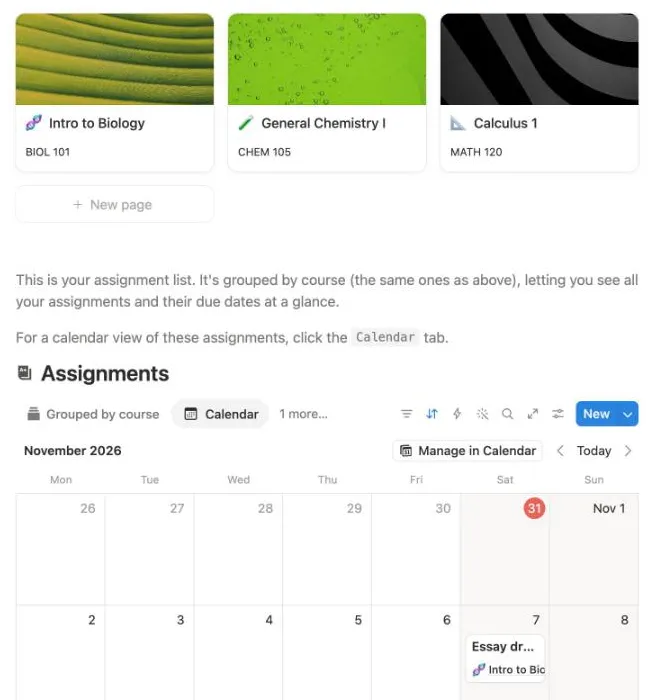
We added an Essay draft due November 7, 2026 under Intro to Biology: it joined that course’s group and showed on the calendar.
Downloads
99,873
Rating
4.7 from 1,527
Last updated
November 2024
Price
Free
A Courses gallery with a card for each class, and each card opens a page for notes and files. Below it, an Assignments list grouped by course, with a Done
box and a deadline, and a Calendar tab. A third section holds extracurriculars, like a debate club.
What we saw: the copy comes with three sample courses and deadlines from February to May 2024, all in red as overdue. We added Essay draft under Intro to
Biology, due November 7, 2026, and the date picker offered a reminder one day before. The course group went from 4 to 5 and the essay showed on the
calendar. There’s no list of what’s due this week, no class times and nowhere to put a grade.
Good
Made by Notion, and ready in a minute
Assignments grouped by course, with a calendar view
A reminder the day before each deadline
Everything works on the free plan
Watch out for
Sample deadlines from 2024 show as overdue until you delete them
by NotionGood for a to-do board for each course, plus clubs and projects
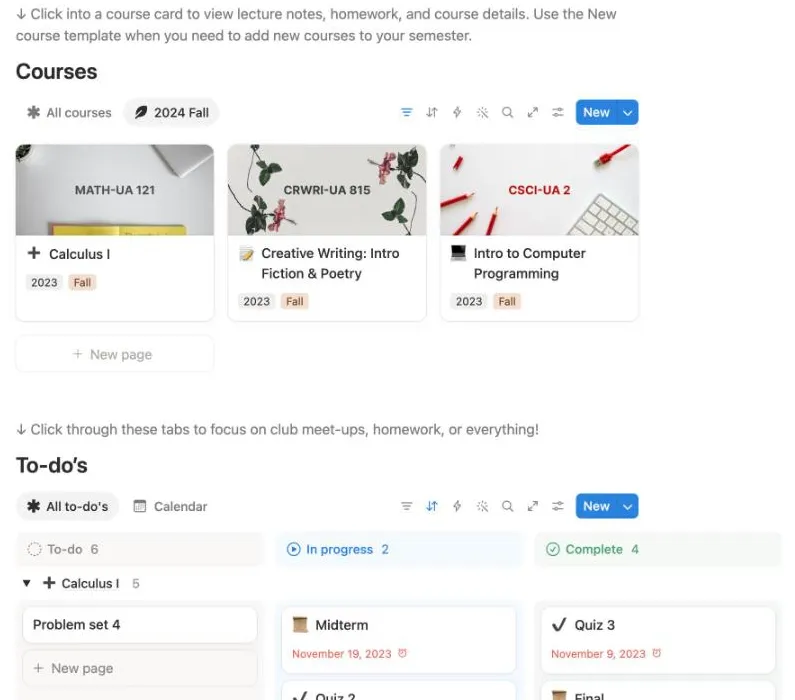
Our Problem set 4 landed in To-do under Calculus I. The course cards above sit under a 2024 Fall tab but are tagged 2023 Fall.
Downloads
92,351
Rating
4.7 from 1,693
Last updated
July 2025
Price
Free
Courses come first as picture cards, each tagged with a year and a semester, with tabs for All courses and 2024 Fall. Below: To-do’s as a board with To-do,
In progress and Complete, grouped by course, and a calendar. Clubs with meeting times and personal projects round it out.
What we saw: a new card under Calculus I, Problem set 4, landed in To-do and the count went from 5 to 6. The samples are dated November 2023, and the 2024
Fall tab shows courses tagged 2023 Fall, so expect to fix the tags and the filter before your first term.
Good
Made by Notion
A to-do board by status, grouped by course
Course pages for lecture notes and homework, from a ready course template
Pages for clubs and personal projects
Watch out for
Sample to-dos are from November 2023
For each new term you change the year and semester tags and the view yourself
by Janice StudiesGood for a cozy daily page with weather, to-dos and this week’s work
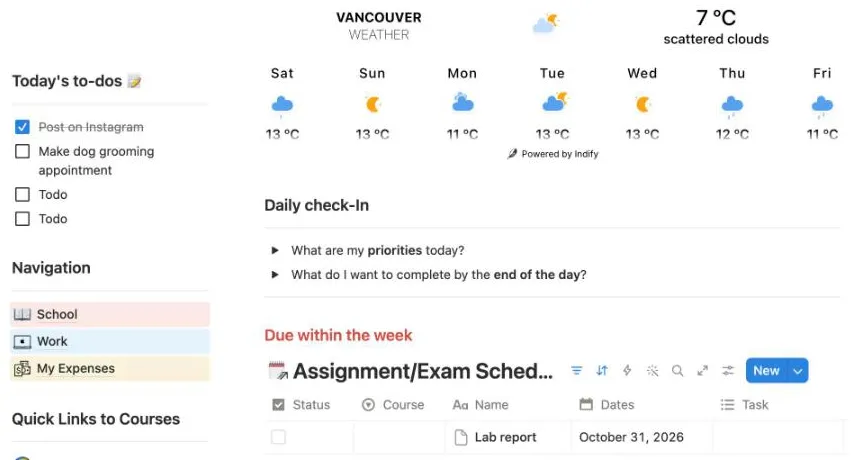
We added a Lab report: it got today’s date on its own and showed under Due within the week and Due within the next month.
Downloads
144,339
Rating
4.8 from 4,919
Last updated
July 2025
Price
Free
One dashboard page: a quote, a weather widget, a clock, progress bars for the day, week, month and year, and a study playlist. Today’s to-dos, a daily
check-in and links to School, Work and My Expenses sit around them. At the bottom, an Assignment/Exam Schedule shows what’s due within the week and within
the next month.
What we saw: both due lists were empty in our copy. A new row, Lab report, got October 31, 2026 as its date without us typing it, and showed in both lists.
Quick Links to Courses opens five blank pages, COURSE 1 to COURSE 5, that you set up yourself. The widgets come from outside services like Indify and showed
Loading for a few seconds.
Good
The most downloaded and most rated on this list
New work gets today’s date and shows in the week and month lists
Weather, a quote, to-dos and a daily check-in on one page
Everything works on the free plan
Watch out for
Course pages are blank placeholders, COURSE 1 to 5
The weather, clock and progress bars are outside widgets that took a few seconds to load
An About me card with the maker’s own details to clear
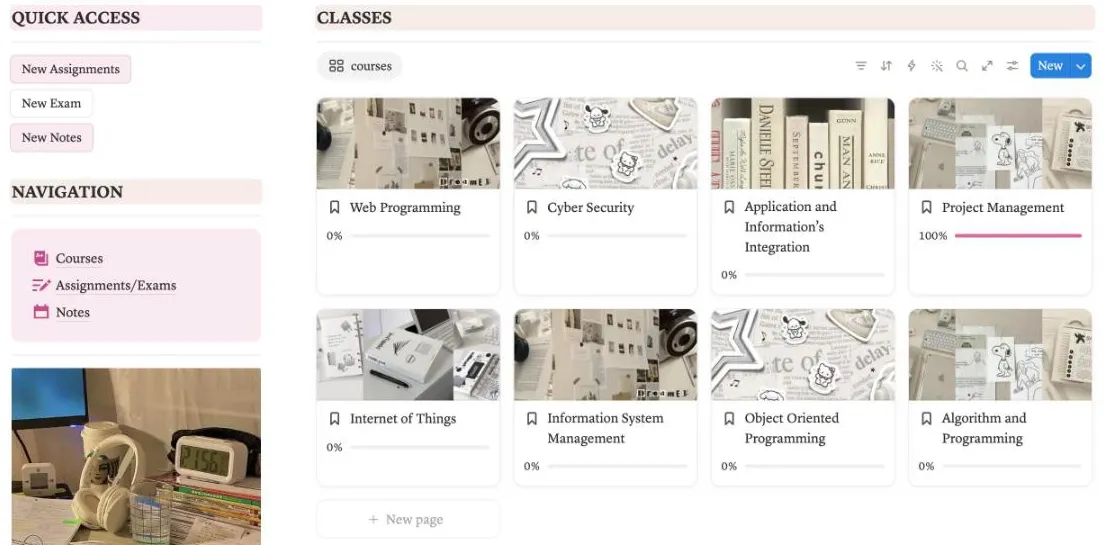
by Ariadne AdresteiaGood for a pink class dashboard with photo covers
Eight sample IT classes, each with a progress bar. Its New Assignments button added a row with no date and no class.
Downloads
117,177
Rating
4.8 from 4,172
Last updated
July 2025
Price
Free
Quick access buttons for New Assignments, New Exam and New Notes, a menu to Courses, Assignments/Exams and Notes, and quick links to Google Classroom and
email. Classes come as picture cards with a progress bar. Below: a class schedule from Monday to Friday, an assignments calendar, a to-do list and a habit
tracker with a New Week button.
What we saw: New Assignments created a row called New Assignments, set to Not started, with no date and no class picked, so you open it and fill both in. A
class page shows the instructor, a classroom link and a count of assignments and exams. The sample work is from February 2025 and the eight sample classes
are IT courses, so plan to replace them.
Good
A pink and cream look with photo covers
Buttons for a new assignment, exam or note
A progress bar on every class
A habit tracker and a to-do list on the same page
Watch out for
New Assignments adds a row with no date and no class, so you fill both in
The class schedule is a typed table: change a class and you edit each cell
Sample classes and work from February 2025 to delete
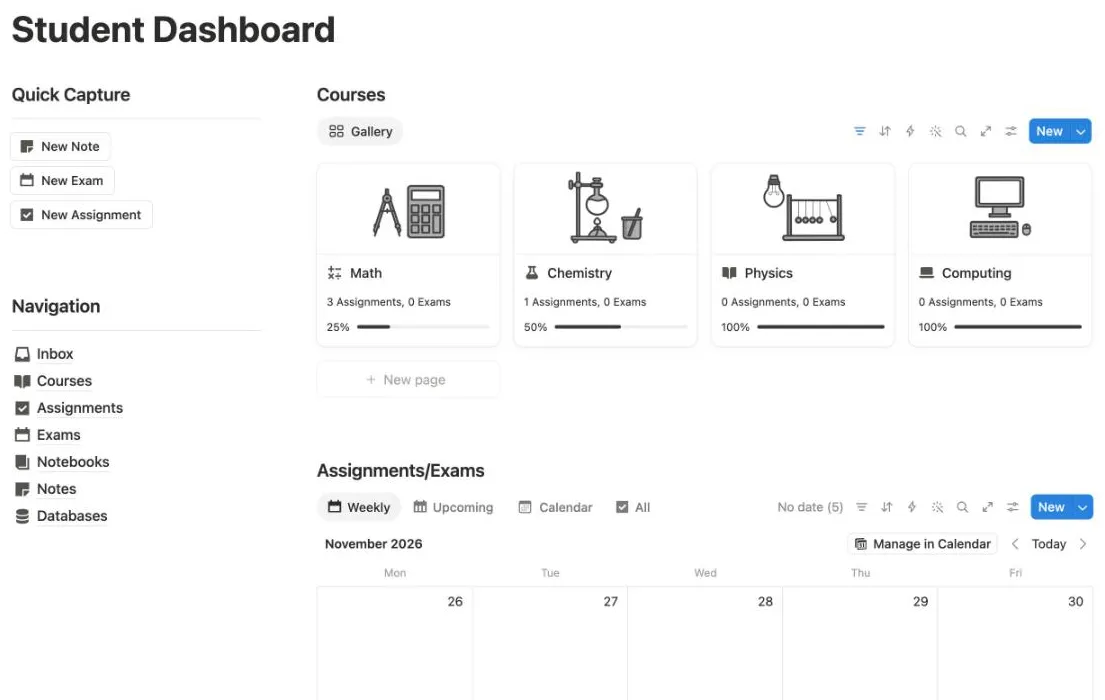
by EasloGood for quick capture and class notes in a clean black and white look
Our Essay draft for Math: the card went from 2 assignments at 33.3% to 3 assignments at 25%.
Downloads
64,306
Rating
4.8 from 1,855
Last updated
July 2025
Price
Free
Quick Capture with New Note, New Exam and New Assignment, a menu to Inbox, Courses, Assignments, Exams, Notebooks and Notes, and a card for each course with
a line drawing. Assignments and exams come in Weekly, Upcoming, Calendar and All views, and the notes side has notebooks, topics, favorites and sample
lecture notes.
What we saw: New Assignment opened a side panel with the course and due date empty. With Essay draft, Math and November 4, 2026, the Math card went from 2
assignments at 33.3% to 3 at 25%. At the bottom there’s a link to a paid pack of subject covers.
Good
Quick Capture buttons for a note, an exam or an assignment
Each course card counts its assignments and exams and shows a %
Weekly, Upcoming and Calendar views of what’s due
Notes with notebooks, topics and favorites
Watch out for
New work opens with no course and no date
Five sample assignments with no dates to clear
A link to the maker’s paid course covers at the bottom
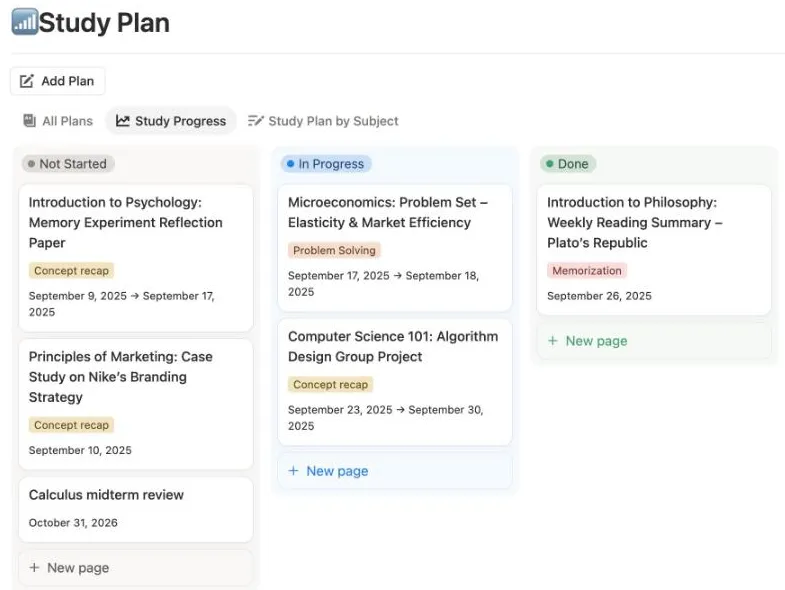
by YCGood for planning study sessions before exams
Add Plan gave our Calculus midterm review today’s date and put it in Not Started.
Downloads
31,477
Rating
4.8 from 322
Last updated
July 2025
Price
Free
It opens on a page titled Get Template Here!, with steps to duplicate the planner inside it or move it out, a user guide and links to the maker’s other
templates. The planner itself is one level down: a Study Plan list where each session has a study type, a lecture, a status and dates, shown as a board, by
subject or on a calendar, plus an Exam Schedule with date, time, room and topics.
What we saw: Add Plan opened a new session with today’s date and Not Started already set. We named it Calculus midterm review and it showed in Not Started
and on the calendar. It’s made for exam study only, so classes and homework need another template.
Good
Add Plan fills in today’s date
Study sessions on a board by status, by subject or on a calendar
An exam schedule with date, time, room and topics
The most copied of the eight in the last 30 days
Watch out for
Opens on a page that asks you to copy the planner again or move it out
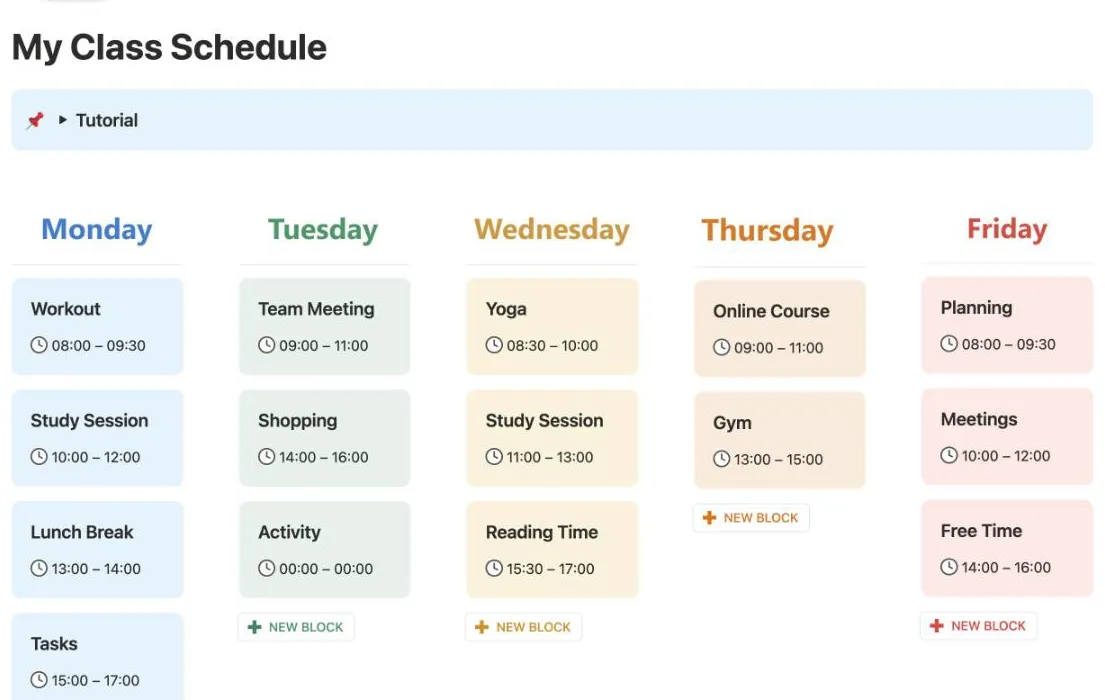
NEW BLOCK under Tuesday added an Activity block at 00:00 to 00:00 for us to type over.
Downloads
27,095
Rating
4.8 from 739
Last updated
October 2026
Price
Free
A board from Monday to Sunday, one colored column per day, where each class or activity is a block with a name and a time, like Workout 08:00 to 09:30. A
tutorial sits at the top. Below the week, a box lists what the paid Premium version adds, then a rating request and links to the maker’s other templates.
What we saw: NEW BLOCK under Tuesday added an Activity block reading 00:00 to 00:00, and we typed the name and times over it. It’s a timetable you read, not
a database, so nothing links to homework or exams.
Good
Updated in October 2026, the newest on this list
A bright column for each day of the week
Nothing dated, so it fits every week of every year
A New Block button under each day
Watch out for
Not a planner: no courses, assignments, exams or dates
Every block is typed text, names and times
Live Block and calendar events are in the paid Premium version, with an ad for it on the page
by The Matcha VibeGood for a cozy matcha cafe look
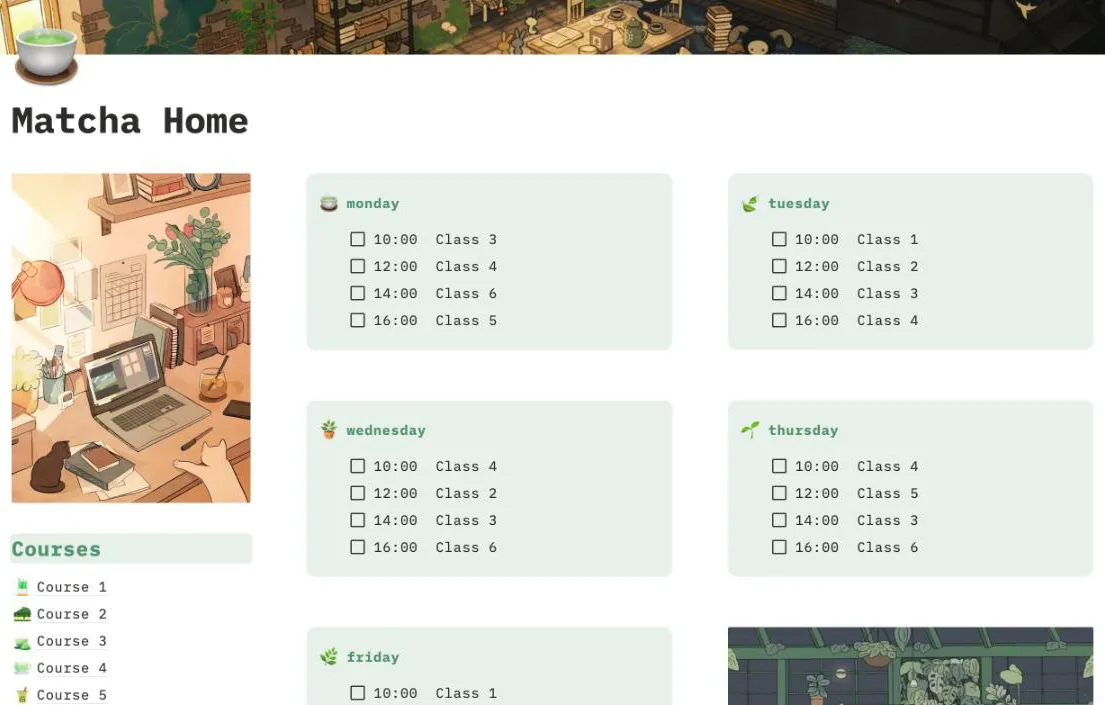
Class times sit in green boxes as typed checklists. Our History essay for November 5, 2026 showed on its calendar.
Downloads
16,635
Rating
4.9 from 941
Last updated
June 2025
Price
Free
Pixel art cafe pictures and typewriter headings. A Courses list, a weekly timetable in green boxes from Monday to Friday, a to-do list, an Assignments &
Exams calendar, goals and a brain dump. More pages: Notebook, Study Sessions, Budget, Habit Tracker, Book Tracker and Cafe Tracker.
What we saw: while copying it, the Marketplace offered to share our email with the maker, and we chose Skip, just get template. A new History essay, due
November 5, 2026, showed on the calendar. Each entry has Course, Grade and Note fields, but Course is plain text, so the course pages don’t list their work
and grades don’t add up.
Good
The highest rating on this list, 4.87
Pixel art and a calm green palette
Pages for study sessions, a budget, habits and books too
Goals and a brain dump on the main page
Watch out for
On an assignment, the course is typed text, not linked to the course page
Grade is a text field, so nothing adds up per course
Course 1 to 6 and Class 1 to 6 placeholders, and placeholder text in the brain dump
We make Notion templates, and Student Planner 2027 is ours. It costs $4, so it isn’t ranked with the free ones above. None of the eight free
ones works out your grade, and the three with a class schedule have you type it by hand. Ours shows your grade in every course and builds your weekly schedule
from your class times.
Is there a free student planner template for Notion?
Yes, many. Notion has four student templates of its own, and on October 31, 2026 the Notion Marketplace listed 1,562 free student planner templates. All eight on this page are free: open the Marketplace page, click Get template and pick your workspace.
What is the most popular free Notion student template?
By downloads on the Marketplace, Janice Studies’ student dashboard, with 144,339 on October 31, 2026, then Ultimate Student’s Planner with 117,177. Notion’s own Student Planner and Student dashboard have over 90,000 each.
Is there a free Notion student template that tracks grades?
Not among the eight we tested. Aesthetic Matcha Student Planner has a Grade field on each assignment, but it’s plain text, so nothing adds up per course. Our Student Planner 2027 works out your grade in every course and the score you need on the rest of the work to reach your goal.
Which free Notion template has a class schedule?
Three of the eight. My Class Schedule is a colorful week of blocks, Ultimate Student’s Planner has a timetable from Monday to Friday, and Aesthetic Matcha Student Planner lists class times in a green box for each day. In all three you type each class name and time yourself.
Do free student templates work on the free Notion plan?
All eight did in our tests, with nothing to upgrade for their main pages. My Class Schedule keeps a few extras, like a Live Block that marks what’s on now, for its paid Premium version.
Why did you leave some popular student templates out?
We only list templates we copied and used ourselves, and from 1,562 free ones we picked the most downloaded planners and dashboards for classes and schoolwork. We didn’t buy paid templates by other makers, so they aren’t here.
Why is your own template on this page?
We make Notion templates, and Student Planner 2027 is ours. It costs $4, so it’s not ranked with the free ones. It has its own section at the end, with what it adds over the free ones.