
Free Notion Widgets
Live widgets for your Notion pages, set up in a minute. Open one, choose a look and paste a single link into Notion.
- Free
- No sign-up
- No watermark
- Dark mode
- Clock A flip clock, a lock screen clock or the time in words, ticking live. Make yours
- Calendar Today circled on a mini month, a week strip or a desk calendar page. Make yours
- Countdown The days, or hours and minutes, until the date that matters. Make yours
- Pomodoro timer Focus and break rounds that end with a gentle chime. Make yours
- Quote of the day One line a day from great books, the Stoics, the Bible or you. Make yours
- Progress bar Watch the year, a semester or your whole life fill up. Make yours
What are Notion widgets?
Notion widgets are small live tools that sit inside a Notion page as embeds. Ours are free and need no account: a clock, a calendar, a countdown, a Pomodoro timer, a quote of the day and a progress bar for the year. Each one has its own page where you pick a look, set colors and a font and copy a link. Paste that link into Notion, choose Embed, and the widget keeps running on your page from then on, in light or dark mode, on the web and in the Notion iPhone app. Every setting lives in the link, so there’s no account to keep and no watermark to remove.
How to add a widget to Notion
-
Open the widget you want from the gallery above and click the look you like best.
-
Press Copy link. In Notion, paste it on a blank line and choose Embed from the small menu that appears.
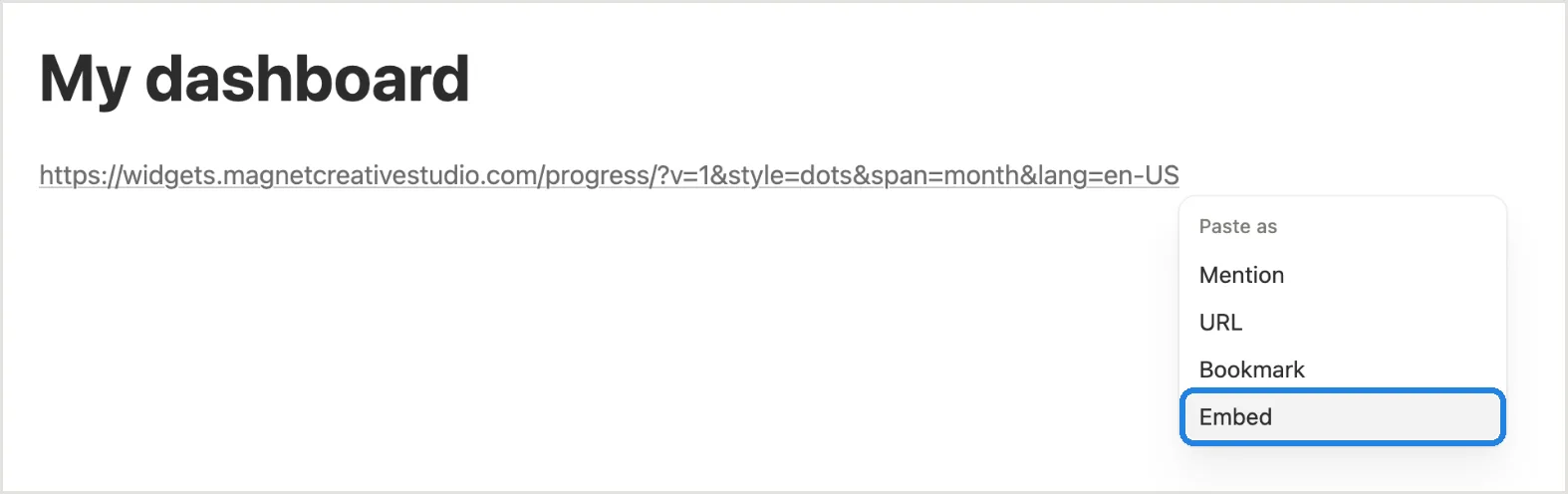
-
Pull the edge of the embed to the size you want. Repeat for each widget; they can share one page.

Widget ideas for your Notion pages
- A home dashboard: the clock with a good morning greeting, above this week’s calendar. Clock · Calendar
- A study page: the Pomodoro timer beside a countdown to your next exam. Pomodoro timer · Countdown
- A journal or vision board: the quote of the day on a sticky note, or your own affirmations. Quote of the day
- A goals page: the year in dots, or a bar for your semester with its first and last day. Progress bar
Rather keep everything inside Notion? A database formula can count down to a date or draw a progress bar: see our countdown formula and progress bar formula guides.
Questions
What is a Notion widget?
A small live tool, like a clock or a calendar, that shows inside a Notion page through an Embed block and updates on its own. Ours run entirely inside that embed, so there’s nothing to install.
Are these Notion widgets really free?
Yes. There’s no paid tier, no account and no watermark, and all the looks on each widget’s page are yours to use.
Do widgets work on the free Notion plan?
Yes. A widget goes in as an embed, and the Embed block is on every Notion plan.
Do they work in the Notion app on iPhone?
Yes. They show in the Notion iPhone app as well as on the web, and each one sizes itself to its block.
Why is my Notion widget not working?
Usually the link went in as plain text or a bookmark. Delete it, paste the link again and pick Embed. If the box stays empty, copy the link once more so it starts with https://widgets.magnetcreativestudio.com.
Can I put several widgets on one page?
Yes, as many as you like. Each link becomes its own embed. To line two up, drag one beside the other and Notion makes columns.
Do they match Notion’s dark mode?
Left on Notion colors, each widget takes the light or dark setting of your device. Running Notion dark on a light device? Every widget can be set to Always dark.
Do you collect anything?
No. The widgets set no cookies, run no analytics and have no login. Your settings are written into the link, and we keep no copy of them.