



The countdown formula
- In your database, add a Date property and set the date you’re counting down to.
- Add a Formula property and call it Days left.
- Paste the formula below and click Done.
dateBetween(prop("Date"), today(), "days")
If your date property has another name, like Wedding date, change "Date" to that name. The formula reads: the days between your date and today.
Here’s what it showed in our test on October 31:
| Date | Days left |
|---|---|
| November 12 | 12 |
| November 1 | 1 |
| October 31, the same day | 0 |
| October 28 | -3 |
Try it with your own date
Pick a date and tick Done to see what each formula in this guide shows. It counts from today, just like Notion does.
- Days left
- 12
- Countdown
- 12 days to go
- Weeks and days
- 1 week, 5 days
- Due
- Due in 12 days
Make it read like a sentence
A bare number works, but a card that says 12 days to go or Tomorrow reads better. This one is text, so it can say anything:
lets(
  days, dateBetween(prop("Date"), today(), "days"),
  ifs(
    empty(prop("Date")), "",
    days > 1, format(days) + " days to go",
    days == 1, "Tomorrow",
    days == 0, "Today",
    days == -1, "Yesterday",
    format(abs(days)) + " days ago"
  )
)
lets saves the day count as days so the formula only works it out once, and ifs picks the first line that’s true. It shows
12 days to go, Tomorrow, Today, Yesterday or 3 days ago, and stays empty when there’s no date.
Weeks and days
For something far off, like a wedding or a move, weeks are easier to picture than a big number of days:
lets(
  days, dateBetween(prop("Date"), today(), "days"),
  w, floor(days / 7),
  d, days % 7,
  ifs(
    empty(prop("Date")), "",
    days < 0, "Passed",
    days == 0, "Today",
    if(w > 0, format(w) + if(w == 1, " week", " weeks"), "") +
    if(w > 0 and d > 0, ", ", "") +
    if(d > 0, format(d) + if(d == 1, " day", " days"), "")
  )
)
In our test, 37 days showed as 5 weeks, 2 days, 12 days as 1 week, 5 days and 7 days as 1 week.
Due dates with a Done box
For tasks, add a Checkbox property called Done. This formula says when a task is due and stops counting once it’s ticked:
lets(
  days, dateBetween(prop("Date"), today(), "days"),
  ifs(
    prop("Done"), "Done",
    empty(prop("Date")), "No date",
    days < 0, "Overdue by " + format(abs(days)) + if(days == -1, " day", " days"),
    days == 0, "Due today",
    days == 1, "Due tomorrow",
    "Due in " + format(days) + " days"
  )
)| Task | Shows |
|---|---|
| Due in a week | Due in 7 days |
| Due tomorrow | Due tomorrow |
| Due today | Due today |
| 3 days late | Overdue by 3 days |
| 3 days late, ticked | Done |
Why your countdown is one day off
Many formulas you find online use now(). It looks the same as today(), but now() includes the time right now, so a date tomorrow is less
than 24 hours away and doesn’t count as a full day. Here’s what both gave us side by side:
| Date | With today() | With now() |
|---|---|---|
| Tomorrow | 1 | 0 |
| In 7 days | 7 | 6 |
| In 12 days | 12 | 11 |
Use today() for anything counted in days. Past dates came out the same with both, so the mistake only shows up on dates still to come.
Count the days since a date
Turn the two dates around and the formula counts up instead of down. Use it for the last time you called someone, cleaned the oven or started a habit:
dateBetween(today(), prop("Date"), "days")Put the countdown on a card
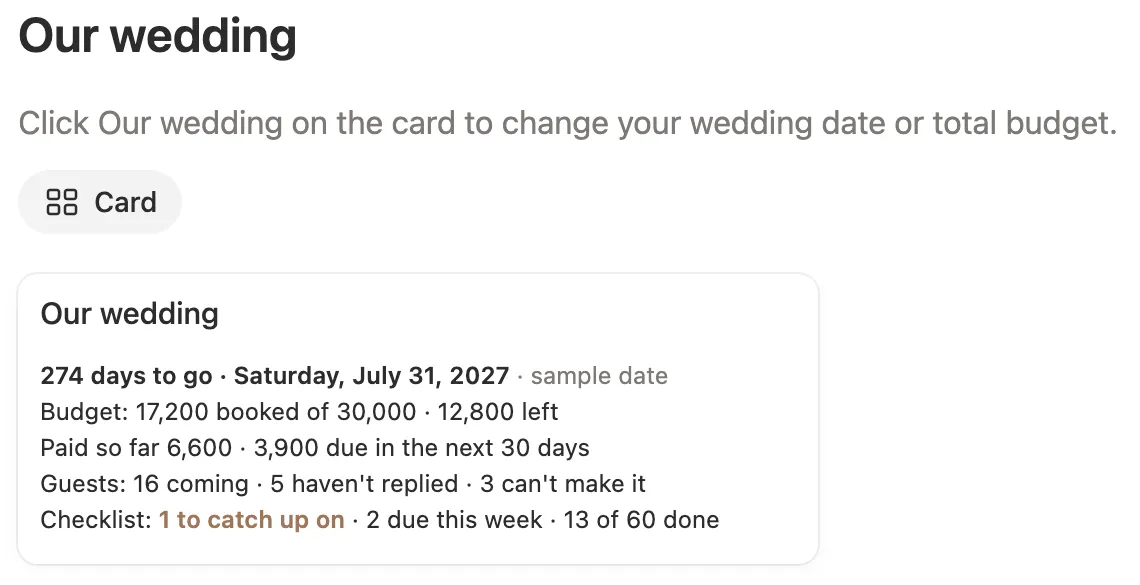
A countdown works best where you’ll see it. In a gallery or board view, open the view’s settings, go to Properties and turn on your countdown, so it shows on every card. Sort the view by the date to keep the closest one first.