
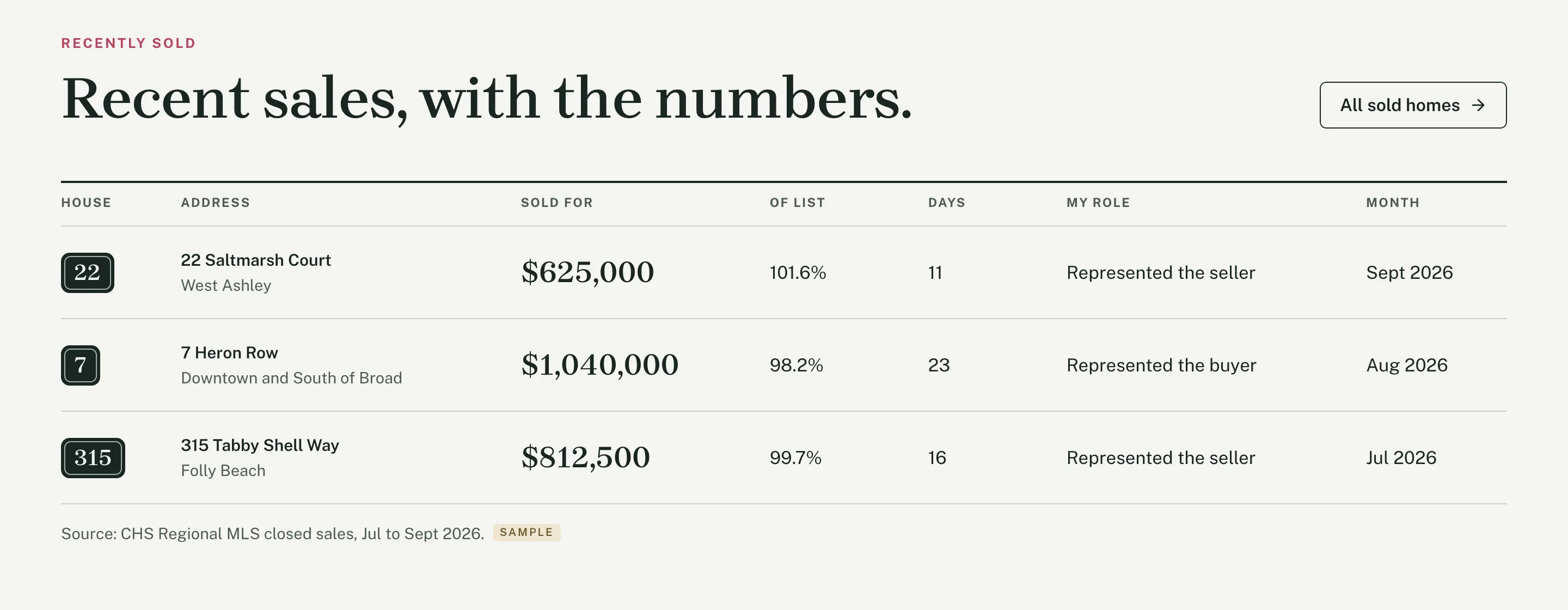
The sold ledger on the home page
Your three latest sales from the Listings collection, with the sold price, percent of list, days to contract and your role, and a source line under the table.
Agent Template
Tilden Real Estate is a website for real estate agents. Tell Framer AI about your business in plain English and it edits the site to fit.
$79 One-time paymentOne website per purchase
Checkout on Contra. Your remix link is on the page you see right after payment.

Magnet Creative Marketing, design and content
 Built for Framer


Tilden Real Estate is a website template for Framer, made for real estate agents and small teams. It costs $79, paid once. You get 22 page types, two linked CMS collections for listings and neighborhoods with eight demo entries each, and 14 skills that let Framer AI change the site when you ask in plain English. Checkout runs on Contra, and the remix link you get afterward copies the full project into your Framer workspace.
Updated
| Price | $79, one-time, one website per purchase |
|---|---|
| Made for | Real estate agents and small teams |
| Pages | Home, Homes for sale, listing page, Sold, Neighborhoods, neighborhood page, Sell, Home value, Buy, Market update, About, Reviews, Contact, Fair housing, Accessibility, Privacy, Terms, Design System, 404 and three thank-you pages |
| CMS collections | 2, listings and neighborhoods, linked to each other |
| Demo content | 8 listings (3 for sale, 1 coming soon, 1 pending, 3 sold) and 8 neighborhoods, each with its own page |
| Framer AI skills | 14, one job each |
| Layouts | Desktop, tablet and phone |
| Forms | Showing request, home value in three steps, buyer brief, seller and contact |
| Structured data | RealEstateAgent, with your brokerage, phone, address and service areas |
| Fonts | Brygada 1918 for headings, Public Sans for text |
| Delivery | Remix link right after checkout on Contra |
| Framer plan | Framer’s free plan to edit and publish on framer.website, a paid site plan for your own domain |
A tour of 1 minute 23 seconds: the pages, the phone layout and three requests in Framer AI, “Make this site mine”, adding a new listing and marking it sold.

Tell Framer AI what to change in plain English. It asks for the facts it doesn’t have instead of making them up.
Type “Make this site mine” with your name, brokerage, city and phone number. Framer AI reads the template’s skills, asks what it still needs, such as your brokerage’s phone number and the license wording your brokerage allows, and then edits the pages.
Listings work the same way. In another test we added a home on James Island and then marked it sold. Framer AI saw that the listing date didn’t fit nine days to an accepted offer and asked which was right before it saved the sale. When you’d rather do it by hand, every page is a normal Framer page you can edit.
Framer AI asks


Your three latest sales from the Listings collection, with the sold price, percent of list, days to contract and your role, and a source line under the table.
Home, Homes for sale, a page for each home, Sold, Neighborhoods, a page for each neighborhood, Sell, Home value, Buy, Market update, About, Reviews, Contact, Fair housing, Accessibility, Privacy, Terms, Design System and 404, plus thank-you pages for the showing, home value and contact forms. Listings and neighborhoods are linked CMS collections, so each new home or area gets its own page in the same layout.


Not legal advice. Check your state’s rules and your brokerage’s policy.
Each skill handles one job, and the default skill sends every request to the right one. In our tests on a copy of the template, we ran the setup, a new listing and marking a home sold with real requests.
agent-setup Puts in your name, brokerage, city, phone, license and photo, and removes numbers you can’t back up.
add-listing Adds a home with photos, price, details and its own page.
mark-sold Moves a home to the sold ledger with price, timing and your role.
open-house Adds or clears open house times on a listing.
neighborhood Adds an area guide with sourced figures and official links.
market-update Refreshes the monthly figures, the table and your read.
add-review Adds real reviews word for word, with source and link.
team Adds or removes team members with matching photos.
state-rules Sets license lines, team wording and state notices.
idx-link Shows or hides a Search all homes link to your IDX search.
fair-housing-check Flags wording and photos that could break fair housing rules.
search-check Checks titles, headings, alt text and setup leftovers for search.
design-system Keeps new sections in this site’s colors, type and components.
default Sends each request to the right skill and blocks made-up facts.
Pay $79 on Contra. It’s a one-time payment.
The page that opens after payment gives you the template’s remix link.
Open the link while you’re signed in to Framer, and the whole project copies into your workspace.
Type “Make this site mine” in Framer AI with your name, brokerage, city and phone, then swap the demo listings, sold homes, reviews and license numbers for yours.
Ask Framer AI for a fair housing check and a search check, publish, and connect your own domain with a paid Framer site plan.
$79, paid once at checkout on Contra. One purchase covers one website.
No. You edit it in the Framer editor or ask Framer AI in plain English, and the skills tell the agent how the site is built.
Not to start: Framer’s free plan lets you edit the template and publish it to a framer.website address. Connecting your own domain needs a paid Framer site plan.
Yes, as a link. The Homes for sale page has a Search all homes button for your IDX search, hidden in the demo. Ask Framer AI to add your link and show it. The homes on the site itself are entries in its Listings collection.
Yes. The demo is set in Charleston, and the state rules skill sets the license lines, team wording and state notices for where you work. Not legal advice. Check your state’s rules and your brokerage’s policy.
A template for Framer that comes with skills, written instructions that tell Framer AI how the site is built. The agent keeps to the design and asks you for prices, license numbers and reviews instead of making them up.
The page that opens after checkout has your remix link. Open it while signed in to Framer and the full project copies into your workspace.
Yes, for one website per purchase, your own or one client’s. For a second site, buy another copy.
No. They are demo content with Sample tags, and the license numbers are zeros on purpose. Replace them with yours before you publish.
Wherever you set them to go. You choose where the showing, home value and contact forms send messages in Framer before you publish.
Email us within 14 days and we’ll fix it or refund you.
We do, the people who built it. Email hello@magnetcreativestudio.com.
Made by Magnet Creative: a digital marketing specialist with 16 years of experience, a designer and a content specialist. Questions before you buy? Email hello@magnetcreativestudio.com.
$79 One-time paymentCheckout on Contra

Framer and the Framer logo are trademarks of Framer B.V. This website is independent of Framer and is not authorized by, endorsed by, sponsored by, affiliated with, or otherwise approved by Framer B.V.