
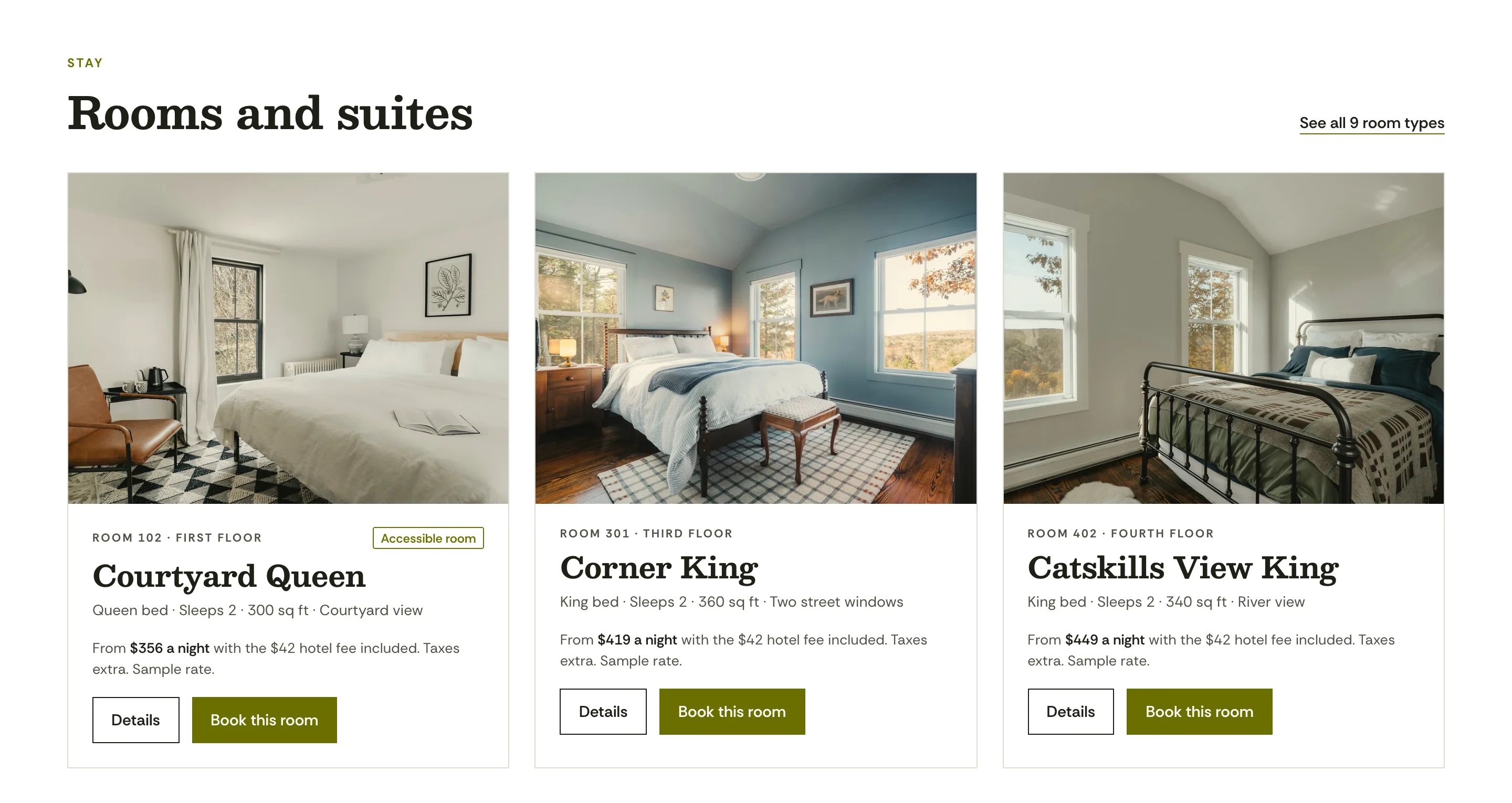
The price a guest sees is the price before taxes
Room cards, room pages, offers and the Book page show the nightly rate with the hotel fee already in it, and say that taxes come on top. Change the fee once and Framer AI carries it into every total.
Agent Template
The Lyman is a website for boutique hotels and inns. Describe your hotel to Framer AI in plain English and it rewrites the site to match.
$79 One-time paymentOne website per purchase
Checkout on Contra. Your remix link is on the page you see right after payment.

Magnet Creative Marketing, design and content
 Built for Framer


Click through The Lyman demo, every page opens in a new tab. Rooms and offers come from the CMS, so each one has its own page.
A page for each room type (9)
The Lyman is a website template for Framer, made for boutique hotels and inns. One payment of $79 gets you 21 page types, CMS collections for rooms and offers with 9 room types and 4 offers in the demo, and 14 skills for Framer AI, so you can change the site by describing what you want. You buy it on Contra and copy the whole project into your Framer workspace with the remix link that comes after payment.
Updated
| Price | $79, one-time, one website per purchase |
|---|---|
| Made for | Boutique hotels and inns, with an inn mode |
| Pages | Home, Rooms, room page, Book, Offers, offer page, Eat & Drink, Gatherings, Gift cards, About, Neighborhood, Gallery, Getting here, FAQ, Policies, Accessibility, Privacy, Terms, Design System, 404 and thank-you |
| CMS collections | 2, rooms and offers |
| Demo content | 9 room types and 4 offers, each on its own page |
| Framer AI skills | 14, each with a single job |
| Layouts | Desktop, tablet and phone breakpoints |
| Booking | Links to your booking engine with dates and guests, or a request form |
| Prices | Totals with the hotel fee included, taxes shown as extra |
| Forms | Date requests, event inquiries and email sign-up, with consent boxes unchecked |
| Structured data | Hotel, with your address, phone, check-in times and amenities |
| Fonts | Besley for headings, Rethink Sans for text |
| Delivery | Remix link shown as soon as you pay on Contra |
| Framer plan | Paid Framer site plan needed only for your own domain |
A silent 81-second tour: the pages and the phone layout, then “Make this site mine” and a new hotel fee typed into Framer AI.

Ask for a change in plain English. When a fact is missing, Framer AI asks you for it instead of guessing.
Type “Make this site mine” with your hotel’s name, town and phone number. When we tried it on a test copy, Framer AI first asked four questions: the legal name and street address, emails and desk hours, check-in, age, dogs and the hotel fee, and how guests book and where they eat. Then it rewrote the name, address, phone, room count, times, fee and bar hours across the site and wrote a new headline for the new town.
Fees work the same way. We typed “Our hotel fee is now $30 a night. Update every price.” It changed the room and package totals, the booking card and the fee wording on the FAQ, and left the separate dog fee alone. When you’d rather work by hand, every page is a normal Framer page.
Framer AI asks


Room cards, room pages, offers and the Book page show the nightly rate with the hotel fee already in it, and say that taxes come on top. Change the fee once and Framer AI carries it into every total.
Home, Rooms, a page for each room, Book, Offers, a page for each offer, Eat & Drink, Gatherings, Gift cards, About, Neighborhood, Gallery, Getting here, FAQ, Policies, Accessibility, Privacy, Terms, Design System and 404, and a thank-you page that follows each form. Rooms and offers are CMS collections, so adding a room type or a package adds its page too, in the matching layout.


It helps you follow common US rules for hotel websites. Not legal advice.
One job per skill, with a default skill that passes each request to the right one. On a test copy we ran two of them with real requests: the hotel setup and a change to the hotel fee.
hotel-setup Replaces the demo hotel with yours, from check-in times to local rules, and asks about anything it lacks.
booking-engine-setup Points every Book button at your booking engine with dates and guests, or at a request form.
add-room Adds a room type with beds, size, view, photos, total price, and dog and accessibility details.
rates-and-fees Updates rates and the hotel fee, and keeps every total on the site in step.
policies-update Edits cancellation, deposit, age, pet and smoking policies everywhere guests read them.
offers-and-packages Adds an offer with dates, inclusions, total price, promo code and terms, and retires old ones.
inn-mode Switches the site between hotel and inn: breakfast, innkeepers, minimum nights and the name.
events-and-weddings Edits venues, capacities, the inquiry form and the event charge notice.
neighborhood-guide Adds places with walking or driving minutes, categories and seasonal events.
add-review Puts in a real rating, review, award or press mention, with where and when it came from.
claims-check Flags prices without fees, risky accessibility or pet wording and unsourced awards, and lists gaps.
search-check Reviews page titles, descriptions, headings, image alt text and the Hotel markup before you go live.
design-system Holds new sections and pages to the hotel’s colors, type, spacing and voice.
default Routes every request to the matching skill and asks you for any fact it’s missing.
Check out on Contra with a single $79 payment.
Your remix link appears on the page that opens as soon as you pay.
Open it while signed in to Framer, and the full project lands in your workspace.
Type “Make this site mine” in Framer AI with your hotel’s name, town and phone number, and answer the questions it asks.
Connect your booking engine, swap in your rooms, rates, offers and photos, run the claims and search checks, then publish and add your domain on a paid Framer site plan.
$79, one payment at checkout on Contra. Each purchase is for one website.
No. Edit it by hand in Framer, or tell Framer AI what to change in plain English. The skills explain to the agent how the site fits together.
Yes, through links. The Book buttons can open SynXis, Mews, Cloudbeds, ThinkReservations and other booking engines with the guest’s dates and party size filled in. Without an engine, they open a request form that the date card fills in.
Yes. Every room and offer shows a total with the mandatory hotel fee in it, and taxes are listed as extra. Tell Framer AI the new fee and it updates every total on the site.
Yes. Ask Framer AI to switch to inn mode. It brings in breakfast and the innkeepers, sets minimum nights and changes how the name reads across the site.
Each accessible room lists its features one by one, such as door width, a roll-in shower and grab bars, and guests book it online like any other room. Measure and confirm each feature at your hotel before you publish.
You can edit it and publish it to a framer.website address without paying Framer. For your own domain you need a paid Framer site plan.
Yes. The demo hotel sits in Hudson, New York. When you set up the site, Framer AI replaces the town, address, travel directions and local details with yours. Not legal advice: check the rules where your hotel is.
A template for Framer that ships with skills, written instructions that explain to Framer AI how the site works. The agent stays within the design and asks you for rates, fees and room details rather than inventing them.
Your remix link shows up on the page right after checkout. Open it while signed in to Framer to copy the whole project into your workspace.
Yes. One purchase covers one website, yours or a client’s. Each further site needs another copy.
No. The Lyman is a sample hotel. Its rates, fees, offers and reviews carry Sample tags and its photos are stock images, so replace them with your own before going live.
Write to us within 14 days and we’ll fix it or give you a refund.
The people who built it. Write to hello@magnetcreativestudio.com.
Made by Magnet Creative: a digital marketing specialist with 16 years of experience, a designer and a content specialist. Questions before you buy? Email hello@magnetcreativestudio.com.
$79 One-time paymentCheckout on Contra
See it on the Framer Marketplace
Framer and the Framer logo are trademarks of Framer B.V. This website is independent of Framer and is not authorized by, endorsed by, sponsored by, affiliated with, or otherwise approved by Framer B.V.